The best robotics sets for middle school students turn screen time into hands-on problem-solving. Students can build moving vehicles, robotic arms, and programmable machines while learning coding, electronics, engineering, and troubleshooting.
This roundup compares 10 options across beginner-friendly builds, Arduino-compatible kits, Scratch and Python support, remote control systems, and more advanced platforms for teens. Use the guide below to match the kit’s complexity, learning tools, and expansion potential to your student.
Best 10 Robotics Sets for Middle School Students Picks for 2026
Best Interactive Learning Robot

- Scratch and Python learning path
- 10+ sensors for interactive projects
- Quick build with guided coding cards
Best For: Beginners progressing from block coding to Python
Best Arduino Robot Car

- Arduino-compatible controller
- FPV camera and sensor modes
- Guided wiring for beginners
Best For: Students learning electronics and autonomous robot control
Best Robotic Arm Starter Set

- Combines a robot car and arm
- Remote control and programmable features
- About two hours of assembly
Best For: Hands-on mechanical building and object-grabbing projects
Best Advanced Multi-Model Kit

- Builds 10 different robot models
- Supports mBlock, Arduino, and Python
- Durable aluminum construction
Best For: Older students pursuing advanced, long-term maker projects
Classroom Engineering Pick
TETRIX Prime Remote Control Kit

- 290+ construction and electronics components
- Wireless control with servos and rechargeable battery
- Structured grades 6–8 engineering activities
Best For: Classroom teams and advanced student builders ages 13+
Mechanical Coding Starter
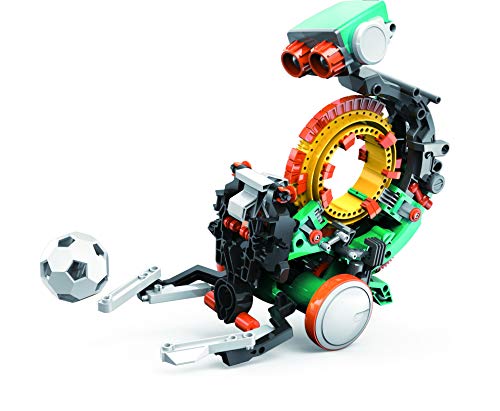
- Programs movement with snap-on coding buttons
- Performs throwing, lifting, kicking, and drawing actions
- Hands-on multi-hour assembly for ages 10+
Best For: Beginners learning mechanical engineering and coding basics
Modular Programming Choice

- Four robot configurations with tank-track expansion
- 5DOF arm and ESP32 programming platform
- Arduino, Scratch, app, and remote-control support
Best For: Ages 12+ exploring coding, robotics, and modular builds
Best Creative Build
3-in-1 Kyanio Programmable Robot Kit

- 560-piece kit with three robot and vehicle designs
- Remote control plus app programming
- Color-coded parts and guided instructions
Best For: Creative builders learning mechanical and coding basics
Best for Coding Progression
ACEBOTT Arduino-Compatible Robot Car

- Scratch, Arduino, and Python support
- 16 story-based tutorials with an ESP32 controller
- Coding available on computers and mobile devices
Best For: Students progressing from block coding to Python
Best Advanced Mechanics

- Programmable five-degree-of-freedom robotic arm
- Arduino, Python, and Blockly support
- Mecanum wheels for multidirectional movement
Best For: Older students exploring robotic arms and advanced motion
Best Interactive Learning Robot – mBot2 Coding Robot
For families seeking robotics sets for middle school students, the Makeblock mBot2 offers a guided introduction to coding, sensors, and robot control. Its step-by-step build, block-based programming, and later Scratch and Python pathways make it approachable for beginners while leaving room for more advanced projects.
Best For: Students who want an interactive coding robot with a gradual learning path from block coding to Python.
Pros:
- Supports Scratch and Python programming through guided lessons and projects.
- Includes more than 10 sensors for line following, obstacle avoidance, and color identification.
- Offers multiple control methods, including Bluetooth, USB, Wi-Fi, and app-based modes.
- Build time is designed to be about 30 minutes, with coding project cards included.
Cons:
- Its recommended age begins at 8, so advanced middle school students may outgrow the introductory activities.
- Some features and expanded projects may require additional modules.
The mBot2 is a strong all-around choice for students who benefit from structured lessons and playful experimentation. Classroom Wi-Fi support and expandable modules also make it suitable for collaborative STEM activities.
Best Arduino Robot Car – UNO R3 Smart Robot Car Kit
Among robotics sets for middle school students, the ELEGOO UNO R3 kit is a practical choice for learners interested in assembling a working robot car. It combines Arduino programming with camera-based FPV, line tracking, obstacle avoidance, and app or remote control.
Best For: Students ready to explore electronics wiring, Arduino code, sensors, and autonomous driving behaviors.
Pros:
- Includes guided wiring, an illustrated tutorial, and example programs for beginners.
- Supports FPV video, line tracking, obstacle avoidance, and multiple driving modes.
- Uses an Arduino-compatible UNO R3 controller and rechargeable battery.
- Useful for family projects, classrooms, coding clubs, and maker challenges.
Cons:
- The manufacturer recommends it for ages 12 and up, with adult guidance for first-time builders.
- Assembly and wiring require more patience than a simpler prebuilt coding robot.
This kit is best when the goal is to learn how hardware and software work together. Its sensors and camera create clear opportunities for modifying example code and testing real-world robot behavior.
Best Robotic Arm Starter Set – VANLINNY 4-DOF Robot Kit
The VANLINNY kit brings a hands-on mechanical focus to robotics sets for middle school students. Students assemble a combined robot car and four-degree-of-freedom arm, then experiment with movement, object grabbing, remote operation, and programming.
Best For: Beginners who want a physical engineering project centered on assembly, motion, and robotic-arm functions.
Pros:
- Combines a mobile robot car with a lifting, rotating, and grabbing arm.
- Includes a remote control, built-in battery, USB charging cable, and assembly tools.
- Provides hands-on practice with spatial reasoning, problem-solving, and mechanical construction.
- Uses ABS and aluminum-alloy components with multiple movement features.
Cons:
- Assembly takes about two hours, making it a longer project for younger builders.
- The notes describe programming support but provide fewer details about the programming platform than some competing kits.
This is a compelling pick for students who learn best by building and manipulating physical mechanisms. The dual-function design offers more variety than a basic remote-controlled car, though adult help may be useful during assembly.
Best Advanced Multi-Model Kit – mBot Ultimate 10-in-1
For older middle school students seeking robotics sets for middle school students with room to grow, the Makeblock mBot Ultimate offers 10 different robot builds. It supports visual coding through mBlock and can progress to Arduino IDE, Python with Raspberry Pi, motor control, sensors, and machine-vision projects.
Best For: Experienced or highly motivated students who want a reusable platform for multiple mechanical and coding projects.
Pros:
- Builds 10 models, including a robotic arm and remote-controlled tank.
- Supports mBlock, Arduino IDE, Arduino-compatible work, and Raspberry Pi expansion.
- Its MegaPi board can control multiple motors and servos for complex projects.
- Aluminum-alloy parts are designed for durable, long-term maker use.
Cons:
- The kit is recommended for ages 12 and up and may be too complex for beginners.
- It requires six AA batteries, which are not included.
- Its larger size and roughly eight-pound weight make it less portable than compact robot kits.
The mBot Ultimate is the strongest option here for students who have outgrown simple guided robots and want a long-term maker platform. Its broad compatibility and 10 build options justify the larger footprint for sustained projects.
Classroom Engineering Pick – TETRIX Prime Remote Control Kit
For schools seeking robotics sets for middle school students, the TETRIX Prime Remote Control Kit is a substantial, classroom-oriented system for ages 13 and up. Its aluminum and plastic components, wireless controller, servos, rechargeable battery, and structured builder’s guide support hands-on exploration of construction, electronics, control systems, and engineering design.
Best For: Middle school classrooms, collaborative projects, and students ready for a more advanced robotics-building experience.
Pros:
- Includes more than 290 structural, mechanical, and electronic components.
- Provides a four-channel wireless controller, rechargeable battery, servos, and gripper kit.
- Designed around structured learning activities aligned with grades 6–8 engineering standards.
- Supports teamwork, systematic testing, and problem-solving.
Cons:
- Its 13+ recommendation may be advanced for younger middle school students.
- The 11.2-pound kit and extensive component count require dedicated storage and setup space.
This is the strongest choice when the goal is a durable, collaborative learning system rather than a quick-build robot. It offers broad engineering capability, though its complexity and classroom-scale design may be more than some home users need.
Mechanical Coding Starter – TEACH TECH Mech-5 Robot
The TEACH TECH Mech-5 is an approachable option among robotics sets for middle school students, especially for beginners interested in mechanical engineering and coding basics. Students assemble the robot themselves, then use snap-on coding buttons and a coding wheel to program actions such as throwing, lifting, kicking, and drawing.
Best For: First-time builders ages 10 and up who want a focused, hands-on introduction to mechanical coding.
Pros:
- Offers several physical activities, including throwing, lifting, kicking, and drawing.
- Uses a mechanical coding wheel, making programming concepts tangible.
- Provides a detailed assembly project with multiple hours of build time.
- Compact 9-inch design uses two AAA batteries.
Cons:
- It is a single-purpose mechanical robot rather than a broader programmable robotics platform.
- Careful assembly is required, and the build may take several hours.
Mech-5 is a good entry point for students who learn best by physically building and experimenting. It has less expansion potential than larger robotics systems, but its clear mission-based design can make foundational coding and mechanics easier to understand.
Modular Programming Choice – ACEBOTT 4-in-1 Robot Arm
The ACEBOTT 4-in-1 Smart Robot Arm and Tank Car gives older students a flexible option among robotics sets for middle school students. The kit combines a five-degree-of-freedom robotic arm, standard car base, tank-track expansion, ESP32 controller, Arduino and Scratch compatibility, app control, and an IR remote, with guided tutorials for assembly and coding.
Best For: Students ages 12 and up who want to explore robotics, programming, electronics, and multiple vehicle configurations.
Pros:
- Supports four configurations, including a robot arm car, tank robot, and robotic arm tank.
- Includes a programmable 5DOF arm for grabbing, lifting, and placing objects.
- Offers 16 guided tutorials, assembly videos, Arduino and Scratch compatibility.
- Can be controlled through an iOS or Android app or an IR remote.
Cons:
- The range of configurations and programming options may be demanding for complete beginners.
- Its plastic construction and small listed dimensions may be less substantial than classroom-scale metal systems.
This kit stands out for variety and software flexibility, making it suitable for students who want to keep progressing after basic assembly. The tutorials help provide structure, while the modular designs create more opportunities for experimentation at home or in STEM activities.
Best Creative Build – 3-in-1 Kyanio Programmable Robot Kit
For shoppers comparing robotics sets for middle school students, the Kyanio kit combines a 560-piece building experience with remote control and app programming. Its three rebuildable models make it a flexible choice for students who enjoy both mechanical construction and interactive play.
Best For: Creative builders who want an approachable introduction to gears, construction, remote control, and basic programming.
Pros:
- Three build options: a machine gun robot, tracked vehicle, and cannon tank.
- Includes color-coded blocks and step-by-step instructions.
- Supports remote control and app programming, with a rechargeable Type-C design.
- Promotes construction, logical-thinking, coordination, and STEM skills.
Cons:
- Its programming experience may be less advanced than kits centered on Arduino or Python.
- Although marketed across a broad age range, younger students may need help during assembly.
This is a strong pick when hands-on building and replayable model options matter more than advanced coding depth. The included one-year warranty against manufacturer defects adds useful buying reassurance.
Best for Coding Progression – ACEBOTT Arduino-Compatible Robot Car
Students looking for robotics sets for middle school students with a clear path from beginner coding to more advanced programming may prefer this ACEBOTT robot car. It supports Scratch, Arduino, and Python, while 16 story-based tutorials provide structured practice with electronics, coding, and robotics.
Best For: Middle schoolers and teens who want to progress from block coding into text-based programming.
Pros:
- Supports Scratch, Arduino, and Python for multiple skill levels.
- Uses an ESP32 controller and includes 16 guided tutorials.
- Can be programmed on computers, tablets, smartphones, and iPads.
- Offers app control and an included IR remote, with no soldering required.
Cons:
- Batteries are not included.
- The supplied details identify it primarily as a 12-years-and-up kit, so younger middle school students may need guidance.
Its broad programming support gives this kit more long-term learning potential than a remote-control-only robot. The mobile-friendly coding options also make it practical for classrooms, training centers, or home learning.
Best Advanced Mechanics – ACEBOTT 5DOF Robot Arm Car
For students ready to explore more complex robotics sets for middle school students, this ACEBOTT kit adds a five-degree-of-freedom robotic arm to a programmable car. Guided tutorials cover grabbing, lifting, placing, navigation, and coding, while Mecanum wheels introduce more advanced movement patterns.
Best For: Older middle school students and teens interested in robotic arms, programming, and mechanical control.
Pros:
- Five-degree-of-freedom arm can grab, lift, and place objects.
- Supports Arduino, Python, and Blockly coding through an ESP32 controller.
- Includes 16 guided tutorials and a paper manual.
- Mecanum wheels enable diagonal travel, drifting, and precise turning.
Cons:
- Batteries are required but not included.
- Optional expansions such as cameras, tank tracks, and solar panels are sold separately.
- Its advanced arm and movement features may require more assembly and troubleshooting time.
This kit is the most mechanically ambitious option in the group. It offers a good foundation for students who have outgrown simple robot cars and want to experiment with coordinated arm movement, navigation, and expandable robotics projects.
How We Picked These Robotics Sets for Middle School Students
We focused on kits that combine meaningful construction with programmable behavior rather than simple push-button toys. The selection includes beginner and intermediate platforms, with attention to age guidance, assembly demands, coding languages, controller or app support, included hardware, and opportunities for experimentation.
We also considered whether a kit can grow with a student. Arduino, ESP32, Scratch, Python, and TETRIX compatibility can make a larger difference than the number of parts alone, especially for students who want to modify designs or move from guided projects to independent builds.
Quick Comparison
| Best For | Look For | Good Fit From This List |
|---|---|---|
| First programmable robot | Visual coding, clear instructions, manageable assembly | Makeblock mBot2, TEACH TECH Mech-5 |
| Arduino experimentation | Open hardware, sensors, sample code, expandable components | ELEGOO, ACEBOTT robot car kits |
| Mechanical building | Multiple models, gears, motors, and structural parts | Makeblock mBot Ultimate, Kyanio |
| Robotic arms | Degrees of freedom, grippers, control options | VANLINNY, ACEBOTT arm kits |
| Structured classroom learning | Durable construction and curriculum-oriented design | TETRIX Prime |
Key Buying Factors
Age, Difficulty, and Supervision
Check the manufacturer’s age range, but also consider the student’s patience and prior experience. A kit intended for ages 8–12 may be a better starting point than a complex teen system for a complete beginner. Advanced builds may require adult help with assembly, wiring, charging, or debugging.
Coding Support
Scratch or Blockly provides an approachable visual start, while Python and Arduino-style programming offer a stronger transition to text-based coding. Confirm which software works with the student’s computer or tablet and whether the kit includes tutorials, sample projects, and an active support community.
Build Type and Learning Goals
Robot cars are usually rewarding quickly and are useful for exploring sensors, navigation, and remote control. Robotic arms emphasize motors, joints, precision, and sequencing. Modular construction systems support broader engineering challenges but may take longer to assemble.
Expansion and Practical Details
Look for replaceable parts, accessible documentation, spare hardware, and compatibility with common boards or sensors. Also check whether batteries, a charger, tools, or a required controller are included. App-dependent kits may be less convenient if device support changes.
Who Should Buy Which Robotics Sets for Middle School Students?
Choose a guided mBot2 or Mech-5-style kit for a younger middle school student who needs an approachable first project. Pick an ELEGOO or ACEBOTT Arduino-compatible car for a learner interested in sensors, coding experiments, and customization.
Students drawn to machines and motion may prefer a robotic arm kit, while builders who want several designs should consider a 10-in-1 or 3-in-1 system. For older students, ambitious hobbyists, or classroom use, TETRIX Prime and the more advanced Makeblock platform offer greater mechanical depth. The best choice is the one that matches current ability while leaving room for the next project.