Choosing among resin printers for schools means balancing detail, reliability, safety, operating cost, and the practical needs of students and instructors. The right machine should fit your curriculum and workspace—not just offer the highest resolution.
These 10 picks cover compact classroom printers, large-format systems, advanced dual-material models, and wash-and-cure bundles to help schools build a manageable resin-printing workflow.
Best 10 Resin Printers for Schools Picks for 2026
Fast All-in-One Pick

- 16K detail and up to 150 mm/h speed
- 30°C smart tank heating
- Includes 7.5L wash-and-cure station
Best For: School labs needing a bundled printer and post-processing station
High-Volume Production Pick

- 18.3L build volume for batch production
- 14-inch 12K screen for fine detail
- Auto-leveling and heated 1,900ml resin tank
Best For: Dedicated labs handling large or repeated print runs
Industrial Lab Pick
LCD F14 Photocuring 3D Printer
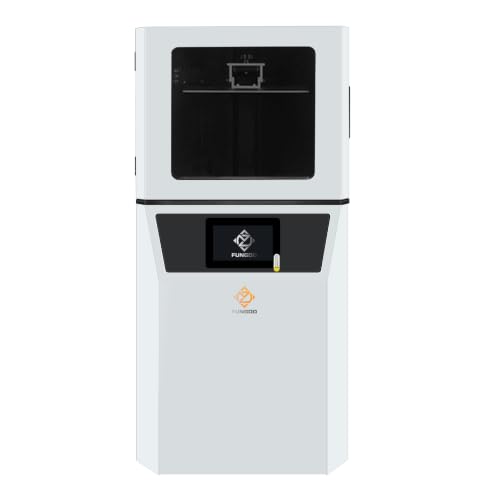
- Large 302 × 162 × 400mm build volume
- 0.02mm Z-axis repeatability
- Wi-Fi, USB, Linux, and CHITUBOX support
Best For: University and enterprise-style school labs
Balanced Detail Pick

- 10-inch 12K LCD for detailed models
- 218.88 × 122.88 × 250mm build volume
- Works with CHITUBOX and Lychee Slicer
Best For: General school makerspaces and design classes
Best Dual-Material Pick

- Dual-color and dual-material printing
- Automatic leveling and AI monitoring
- Supports resins up to 8,000 cps
Best For: Creative classroom projects using multiple colors or materials
Best High-Resolution Large-Format Pick

- 16K resolution for intricate models
- Automatic heated resin tank
- AI camera and Wi-Fi transfer
Best For: Detailed prototypes and larger classroom print jobs
Best Lightweight Beginner Pick

- 10K detail from a 7-inch mono LCD
- Compact 7.7-pound design
- Power-resume and simplified leveling
Best For: Beginner classes and space-conscious school labs
Best Beginner-Friendly Pick

- Automatic leveling simplifies setup
- 4K detail with speeds up to 70mm/h
- Sensors monitor common printing issues
Best For: Classrooms and makerspaces needing an approachable resin printer
Best for High-Volume Projects
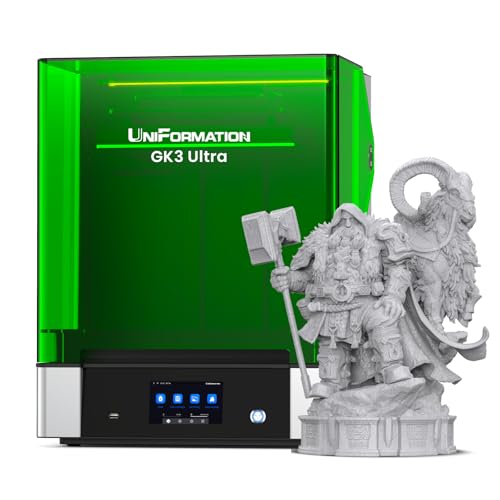
- Large 300 × 160 × 300mm build volume
- 16K screen for precise detailed prints
- Automatic feeding and resin heating support long jobs
Best For: Advanced labs producing large prototypes or print batches
Best Complete Workflow Bundle

- 10K resolution for fine model detail
- Includes Wash & Cure 3.0 station
- 153.4 × 87 × 165mm build volume
Best For: Schools wanting a compact printer and post-processing setup together
Fast All-in-One Pick – ELEGOO Saturn 4 Ultra 16K
ELEGOO Saturn 4 Ultra 16K Resin 3D Printer and ELEGOO Mercury Plus V3.0 Wash and Cure Station
Check Price On AmazonFor schools seeking resin printers for schools that combine detailed output with a streamlined post-processing setup, the ELEGOO Saturn 4 Ultra 16K is a practical bundle. It includes a flip-up-lid printer with smart tank heating at 30°C, printing speeds up to 150 mm/h, and a matching wash-and-cure station.
Best For: School labs that want a high-speed printer and dedicated washing and curing equipment in one package.
Pros:
- 16K resin printing with a generous 8.33 × 4.66 × 8.66-inch build area
- Smart tank heating at 30°C can support more consistent resin conditions
- Includes the Mercury Plus V3.0 wash and cure station with 7.5-liter capacity
- Advertised printing speed of up to 150 mm/h
Cons:
- The supplied notes do not specify school-focused safety or ventilation features
- Requires space and procedures for handling resin and post-processing
This is a strong choice when a classroom or makerspace values throughput and wants washing and curing handled by a matching accessory. Confirm that the lab has appropriate resin-handling and ventilation procedures before purchase.
High-Volume Production Pick – ANYCUBIC Photon P1 Max
The ANYCUBIC Photon P1 Max stands out among resin printers for schools when a lab needs a very large build area for oversized prototypes or dense batch runs. Its 18.3-liter build volume, 14-inch 12K screen, heated resin tank, and automatic leveling are aimed at stable, high-volume workflows.
Best For: Large school makerspaces, technical programs, or labs producing multiple models or oversized prototypes in one cycle.
Pros:
- Large 285.5 × 214 × 300 mm build volume
- 14-inch 12K monochrome screen with 24.8 × 24.8 μm square pixels
- 1,900 ml heated resin tank supports temperatures up to 35°C
- Auto-Leveling 3.0 includes self-checking and real-time force feedback
Cons:
- Large 68.9-pound body requires substantial, stable placement space
- The supplied dimensions are 20.08 × 20.87 × 29.53 inches, which may exceed smaller classroom workspaces
- The notes do not mention an included wash-and-cure station
The P1 Max is best suited to a dedicated workshop rather than a compact classroom desk. Its size and automated calibration can reduce setup friction, while the large vat and build volume support batch-oriented instruction and prototyping.
Industrial Lab Pick – LCD F14 Photocuring 3D Printer
For schools with advanced labs or enterprise-style workflows, the LCD 3D Printer F14 offers an industrial-oriented feature set. It combines a large 302 × 162 × 400 mm build volume with 6K resolution, a reinforced Z-axis, Wi-Fi and USB connectivity, and Linux-based operation.
Best For: University labs, engineering programs, and school makerspaces that need long-run stability, wireless task management, and large-format printing.
Pros:
- Extra-large 302 × 162 × 400 mm build volume
- Ball screw, linear guide, and dual-slider Z-axis design with 0.02 mm repeatability
- Adjustable 0.01–0.15 mm layer thickness for fine-detail work
- Wi-Fi and USB connectivity with Linux OS and CHITUBOX compatibility
Cons:
- At 68 pounds, it is not an especially portable classroom printer
- Its 14.2 × 16.9 × 25.6-inch dimensions require dedicated space
- The supplied notes do not include a wash-and-cure system
The F14 makes the most sense where dependable positioning and continuous operation matter more than a compact footprint. Its connectivity and software compatibility can also help instructors manage jobs across a lab, provided the school has suitable resin safety procedures.
Balanced Detail Pick – ELEGOO Saturn 3 MSLA 12K
The ELEGOO Saturn 3 MSLA 12K is a balanced option for schools comparing resin printers for schools around detail, build size, and software flexibility. Its 10-inch 12K monochrome LCD, 218.88 × 122.88 × 250 mm build volume, and 405 nm COB light source support detailed classroom models and prototypes.
Best For: General school makerspaces that need high-resolution printing without moving to an especially large industrial-format machine.
Pros:
- 12K LCD with 19 × 24 μm XY resolution for intricate models
- Build volume of 218.88 × 122.88 × 250 mm
- Uniform 405 nm COB and Fresnel light source supports consistent exposure
- Compatible with CHITUBOX and Lychee Slicer through an open-source GOO format
Cons:
- Advertised print speed is up to 70 mm/h, lower than the fastest option in this roundup
- The supplied notes do not mention automatic leveling or heated resin
- Post-processing equipment is not included in the listed printer package
Saturn 3 is a sensible middle-ground choice for art, design, and engineering classes focused on fine detail. Its protected LCD, textured build plate, and flexible slicer compatibility can help support repeatable student projects, though the school must provide separate washing and curing procedures.
Best Dual-Material Pick – Photon P1
For schools seeking resin printers for schools that can support creative, color-rich projects, the Anycubic Photon P1 stands out with dual-color and dual-material printing. Its automatic leveling, AI monitoring, and sturdy motion system are designed to simplify classroom operation and reduce avoidable print failures.
Best For: Schools teaching design, prototyping, and creative model-making with multiple colors or materials.
Pros:
- Dual-color or dual-material printing expands classroom project options and can reduce resin use for small models.
- Factory-calibrated automatic leveling and pre-print self-checks reduce setup demands.
- AI monitoring checks build-plate installation, layer separation, resin level, and vat residue.
- Handles ultra-high-viscosity resins up to 8,000 cps and includes pre-configured Anycubic resin settings.
Cons:
- At 39 pounds and 28 x 14 x 13 inches, it needs a sturdy, dedicated workspace.
- Its advanced dual-material capability may be more than needed for basic single-color assignments.
The Photon P1 is a strong fit for classrooms prioritizing reliability and creative flexibility. Its monitoring and leveling features can reduce hands-on troubleshooting, while its material range supports more advanced projects.
Best High-Resolution Large-Format Pick – Saturn 4 Ultra 16K
For schools needing resin printers for schools that can produce intricate or larger models, the ELEGOO Saturn 4 Ultra 16K combines a 16K LCD screen with an 8.33 x 4.66 x 8.66-inch build area. Automatic resin heating, leveling, monitoring, and Wi-Fi transfer make it well suited to structured classroom workflows.
Best For: Schools producing detailed prototypes, larger models, or multiple classroom prints.
Pros:
- 16K resolution with 14 x 19 μm XY detail supports intricate models.
- Automatic heated resin tank helps maintain printing conditions when temperatures fall below 25°C.
- AI camera enables process monitoring, error awareness, and time-lapse recording.
- Automatic leveling, power-on resume, Wi-Fi transfer, and cluster printing support easier operation.
Cons:
- Its 12.8 x 12.9 x 21.5-inch size requires substantial vertical clearance.
- The 35.4-pound printer may be difficult to move between classrooms.
- Its advanced features may be unnecessary for introductory projects.
The Saturn 4 Ultra 16K is a capable choice when detail, volume, and classroom monitoring matter most. Its heated tank and automated checks can help schools maintain more consistent printing conditions.
Best Lightweight Beginner Pick – Photon Mono 4
For schools looking for resin printers for schools that are compact and approachable, the Anycubic Photon Mono 4 offers a 7-inch 10K mono LCD, a useful build volume, and a beginner-friendly four-point leveling system. Its 7.7-pound weight also makes it easier to place or relocate than the larger alternatives.
Best For: Beginner classes, smaller labs, and schools needing a compact printer for detailed models.
Pros:
- 10K resolution and 17 x 17 μm pixels support highly detailed prints.
- 6.04 x 3.42 x 6.49-inch build volume accommodates many school projects.
- After initial leveling and screw tightening, repeated leveling is not required according to the supplied notes.
- Power-resume functionality can reduce wasted material and time after an outage.
Cons:
- It does not support the Anycubic app.
- Its build volume is smaller than the Saturn 4 Ultra 16K.
- The four-point leveling process still requires an initial setup step.
The Photon Mono 4 is a practical entry point for schools that value detail without a heavy, oversized machine. It is especially appealing for beginner instruction and classrooms with limited space.
Best Beginner-Friendly Pick – ELEGOO Mars 5
For schools looking for resin printers for schools that are straightforward to set up, the ELEGOO Mars 5 combines automatic leveling, helpful sensors, and a compact footprint. Its 6.6-inch 4K monochrome screen supports detailed models at speeds up to 70mm/h.
Best For: Classrooms and school makerspaces that prioritize simple setup, reliable monitoring, and detailed small-to-medium models.
Pros:
- Automatic leveling and a laser-engraved build plate help simplify setup and improve adhesion.
- Intelligent sensors can detect low resin, foreign objects, film replacement needs, and overheating.
- 4K resolution, 35 × 35μm XY resolution, and COB lighting support detailed, smooth models.
- Compact 19.11-pound design includes practical features such as one-touch plate locking and pouring spouts.
Cons:
- The smaller build area is less suited to large models or high-volume batch printing.
- Students and staff still need to learn proper supports, settings, and resin-tank cleaning.
The Mars 5 is a practical school choice when ease of operation matters more than maximum capacity. Its automated setup and safety-oriented sensing can reduce routine friction, but resin handling and post-print cleanup remain part of the classroom workflow.
Best for High-Volume Projects – UniFormation GK3 Ultra
For schools managing large models or multiple parts per print, the UniFormation GK3 Ultra offers a substantial 300 × 160 × 300mm build volume. Its 16K screen, heated resin system, and automatic feeder are designed for sustained, demanding workloads.
Best For: Advanced school labs, technical programs, and makerspaces producing large prototypes or batches of components.
Pros:
- Large build volume supports bigger models and multiple parts in one print.
- 16K resolution and 20 × 26μm pixel size deliver sharp detail.
- Automatic resin feeding helps maintain supply during large prints.
- Built-in heating can bring resin to 25°C or 30°C, even when ambient temperatures reach 0°C.
Cons:
- At 85.8 pounds, it is considerably heavier and less portable than compact classroom printers.
- Its large format may be more capacity than smaller classes or occasional users require.
- Resin printing still requires responsible handling, ventilation considerations, and post-processing procedures.
The GK3 Ultra is best viewed as a production-oriented option rather than a basic introductory machine. Its capacity and automated resin management can benefit busy programs, while the quick-release vat, drip hanger, and carbon filter help make maintenance more manageable.
Best Complete Workflow Bundle – ANYCUBIC Photon Mono 4
The ANYCUBIC Photon Mono 4 bundle pairs a detailed resin printer with the Wash & Cure 3.0 station, making it a convenient option for schools that want printing and post-processing equipment together. The printer provides 10K resolution and a 153.4 × 87 × 165mm build volume.
Best For: Classrooms and school clubs that want a compact resin-printing setup with dedicated washing and curing equipment.
Pros:
- 10K resolution and 17 × 17μm pixel size support highly detailed models.
- LighTurbo matrix lighting is designed to provide balanced, uniform exposure and smoother surfaces.
- The included Wash & Cure 3.0 has a 4L cleaning bucket and increased basket capacity.
- The gooseneck curing light is designed to improve curing on subtle or difficult-to-reach areas.
Cons:
- The 153.4 × 87 × 165mm build volume limits the size of individual models.
- The bundle’s washing and curing workflow still requires students to follow careful resin-handling procedures.
- The wash-and-cure basket is intended for LCD printers sized 7.3 inches or less, so compatibility should be considered for future equipment.
This bundle is appealing when a school wants a more complete resin-printing workflow without sourcing a separate wash-and-cure station. It offers strong detail in a manageable format, although its build area is better suited to classroom-scale models than oversized projects.
How We Picked the Best Resin Printers for Schools
We focused on factors that matter in educational settings: print quality, build volume, ease of setup, automation, reliability, maintenance, and overall classroom practicality. We also considered whether a printer can support repeated student projects without creating an unnecessarily difficult post-processing routine.
Resolution was only one part of the evaluation. A printer with automatic leveling, mechanical sensors, dependable exposure controls, or a compatible wash-and-cure station may be more useful to a school than a higher-resolution model that requires constant adjustment. We also included options at different sizes and price levels so schools can match equipment to available space, enrollment, and project scale.
Quick Comparison
- Best for detailed classroom work: ELEGOO Saturn 4 Ultra 16K and ELEGOO Saturn 3 MSLA 12K models.
- Best for a complete workflow: ELEGOO Saturn 4 Ultra with Mercury Plus V3.0 or the ANYCUBIC Photon Mono 4 with Wash & Cure 3.0.
- Best for larger projects: ANYCUBIC Photon P1 Max and UniFormation GK3 Ultra.
- Best for compact, approachable setups: ANYCUBIC Photon Mono 4 and ELEGOO Mars 5.
- Best for specialized production: the LCD F14 industrial-grade printer and ANYCUBIC Photon P1 dual-color/material model.
Key Buying Factors for Resin Printers for Schools
Safety and Ventilation
Uncured resin can irritate skin and produce fumes, so plan for ventilation, protective gloves, eye protection, spill control, and secure resin storage. A dedicated area away from food, general classrooms, and unsupervised access is strongly recommended.
Ease of Operation
Features such as automatic leveling, smart sensors, guided setup, and dependable touchscreen controls can reduce failed prints and instructor workload. Consider how easily students can prepare files and whether staff can maintain the machine between classes.
Build Volume and Throughput
Small printers can be easier to manage but may require more batches. Large-format models can print more parts at once, although they need additional workspace, resin, cleaning capacity, and post-processing time.
Post-Processing Requirements
Every resin workflow needs washing and curing. A bundle or matching wash-and-cure station can improve consistency and reduce mess, especially when several students use the printer during the same day.
Ownership Cost
Budget for resin, replacement tanks or films, build plates, gloves, cleaning materials, ventilation, and failed prints. Also verify software compatibility, warranty coverage, replacement-part availability, and the manufacturer’s support resources before purchasing.
Who Should Buy Which Resin Printers for Schools?
Schools introducing resin printing should start with a compact, sensor-assisted model or a bundle that includes post-processing equipment. Makerspaces and advanced design programs may benefit from the higher resolution, larger capacity, or specialized capabilities of the Saturn, Photon P1, GK3 Ultra, or F14 options. If multiple classes share one machine, prioritize build volume, reliability, and workflow speed over headline resolution alone.
Whichever model you choose, establish written operating procedures, train students before independent use, and assign responsibility for cleaning and waste disposal. That preparation will have as much impact on classroom success as the printer itself.