The best planetarium projectors for classrooms turn astronomy concepts into visual, memorable lessons. They can help students explore constellations, planetary features, moon phases, and the scale of space without relying only on textbook diagrams.
This roundup includes educational science kits alongside disc-based galaxy projectors. Use the buying guide below to match projection content, room size, controls, and durability to your classroom needs.
Best 10 Planetarium Projectors for Classrooms Picks for 2026
Versatile Classroom Pick
Smithsonian Dual Projector Science Kit
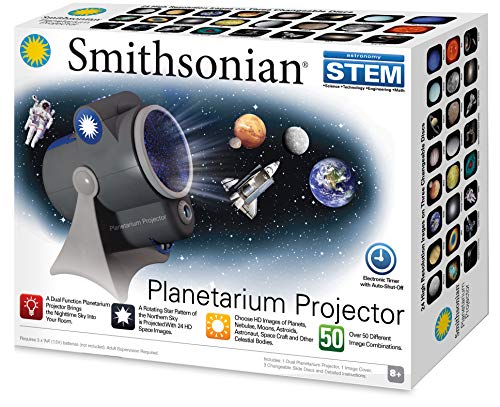
- Rotating Northern Sky projection
- 24 HD space images and 50+ combinations
- Auto-shutoff timer and nightlight mode
Best For: Classrooms teaching constellations and space exploration
Wide-View Classroom Option
Brainstorm Night Sky Projector

- Projects images up to 12 feet wide
- Shows over 20,000 stars
- Includes four interchangeable discs
Best For: Whole-class demonstrations with ample wall or ceiling space
Guided Constellation Choice
LEXiBOOK Planetarium Projector
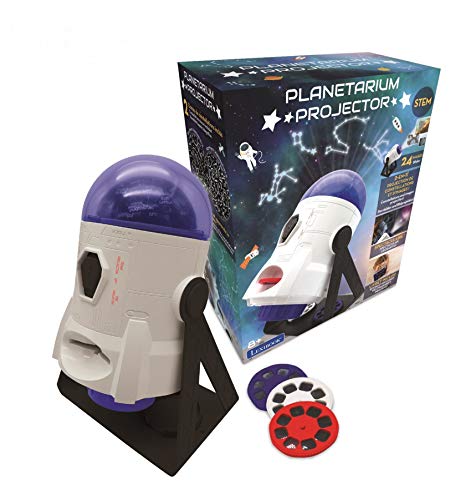
- Motorized 360-degree constellation projection
- Two constellation domes and 24 space images
- Includes map, booklet, and focus ring
Best For: Teacher-led constellation identification activities
Most Astronomy-Focused Pick
T&K Essential STEM Planetarium

- Accurate Northern and Southern Hemisphere maps
- Dual projectors with James Webb images
- USB-C power and adjustable auto-off timer
Best For: Hemisphere-based astronomy and STEM instruction
Best Overall
13-in-1 Galaxy Planetarium Projector

- 13 HD celestial scenes, including the Solar System and galaxies
- 360° rotation with adjustable focus and broad coverage
- 1-, 2-, and 4-hour automatic shutoff options
Best For: Versatile classroom astronomy displays and demonstrations
Best for STEM Lessons
Bright 13-Disc Space Projector

- 13 scenes include brief introductions to featured space topics
- 2X-brighter output and 30% wider projection coverage
- Two rotation speeds plus adjustable focus and timer
Best For: Guided STEM lessons and interactive astronomy displays
Best Adjustable-Focus Pick

- 13 interchangeable astronomy film discs
- Adjustable focus and 360-degree rotation
- Simple tabletop, three-button operation
Best For: Small-group lessons and darkened classroom demonstrations
Best for Wide Coverage
FlyLily 13-in-1 Space Projector

- Stated coverage up to 754 square feet
- 13 educational space display scenarios
- Quiet operation with focus and timer controls
Best For: Larger classroom surfaces and astronomy presentations
Best Kid-Friendly Controls
Pro 13-Disc Planetarium Projector

- Simple three-step operation for children
- 13 replaceable space-themed film discs
- Adjustable stand with timers and rotation
Best For: Early learners and small interactive demonstrations
Versatile Classroom Pick – Smithsonian Dual Projector Science Kit
Smithsonian Optics Room Planetarium and Dual Projector Science Kit, Black/Blue, Age 8 and Up
Check Price On AmazonFor classrooms seeking planetarium projectors for classrooms with both star viewing and topic-based visuals, this Smithsonian kit combines a rotating Northern Sky projection with interchangeable space-image discs. Its 24 HD images and more than 50 combinations support varied STEM lessons for ages 8 and up.
Best For: Elementary and middle-school classrooms introducing constellations, planets, and space exploration.
Pros:
- Projects a rotating Northern Sky star pattern.
- Includes 24 HD images across four changeable slide discs.
- Offers more than 50 image combinations and can function as a nightlight.
- Includes motorized 360-degree rotation and an auto-shutoff timer.
Cons:
- Batteries are not included.
- Recommended for ages 8 to 15, so it may be less suitable for very young learners.
- No manufacturer warranty is listed.
Its dual-function design makes it a flexible teaching aid, especially when a lesson benefits from switching between a star map and recognizable space imagery.
Wide-View Classroom Option – Brainstorm Night Sky Projector
This Brainstorm projector is a practical choice among planetarium projectors for classrooms when projection size and star density matter. It displays rotating images up to 12 feet wide and includes views of the solar system, constellations, starlight, and moonlight.
Best For: Group demonstrations in classrooms with enough wall or ceiling space for a broad projection.
Pros:
- Projects ultra-sharp rotating images up to 12 feet wide.
- Displays more than 20,000 stars in the Hawaiian night sky.
- Includes four discs for varied space-themed viewing.
Cons:
- The supplied notes do not specify a timer or nightlight mode.
- A large projection area may require a suitably open classroom surface.
- The listed recommended age range is 8 to 12 years.
Its emphasis on a large, sharp star field can help make whole-group viewing more engaging, provided the classroom has adequate projection distance and space.
Guided Constellation Choice – LEXiBOOK Planetarium Projector
LEXiBOOK, Planetarium Projector, NLJ180 | 24 space images, 2 constellation domes, STEM learning
Check Price On AmazonThe LEXiBOOK NLJ180 is one of the more lesson-friendly planetarium projectors for classrooms, pairing motorized 360-degree constellation projections with a constellation map, booklet, and space images. Its built-in focal ring is designed to keep projections sharp on ceilings or walls.
Best For: Guided activities that connect constellation names with space-exploration imagery.
Pros:
- Includes two constellation domes for learning constellation names.
- Projects 24 space images, including Moon and space-shuttle scenes.
- Works on ceilings or walls and includes a built-in focus ring.
- Comes with a constellation map and space booklet.
Cons:
- The supplied notes do not specify a projection distance or image size.
- Battery power is listed, but batteries are not identified as included.
- The age information is inconsistent, with details listing both 8+ and a manufacturer recommendation of 3 years and up.
This model stands out for pairing projection with supporting print materials, making it useful for teacher-led constellation identification and follow-up discussion.
Most Astronomy-Focused Pick – T&K Essential STEM Planetarium
For educators comparing planetarium projectors for classrooms with an emphasis on accurate sky mapping, the T&K Essential STEM Tools set covers both Northern and Southern Hemispheres. It also adds a second projector for James Webb Space Telescope images and runs from USB-C power without batteries.
Best For: STEM lessons comparing hemispheres, rotating constellations, and modern space imagery.
Pros:
- Includes accurate star maps for both hemispheres.
- Two projectors can operate simultaneously.
- Includes four James Webb Space Telescope image discs.
- Offers tabletop or wall-hanging use, nightlight mode, and 15-, 30-, or 60-minute auto-off settings.
Cons:
- Requires USB-C power and does not use batteries.
- The supplied notes do not specify a projection size.
- The listed age details are inconsistent, though the product highlights ages 8+.
This is the strongest fit for structured astronomy instruction when hemisphere coverage and contemporary telescope imagery are more important than a simple decorative star display.
Best Overall – 13-in-1 Galaxy Planetarium Projector
For classrooms seeking planetarium projectors for classrooms that can also work as engaging room displays, this model combines 13 celestial film discs with adjustable focus, 360° rotation, and a wide projection range. It can show subjects such as the Solar System, Moon, Milky Way, black hole, and several galaxies on walls, floors, or ceilings.
Best For: Teachers and families wanting a versatile astronomy display with multiple space topics and automatic shutoff.
Pros:
- Includes 13 HD space scenes covering solar-system and deep-space topics.
- Projects from 1.5 to 16 feet and covers approximately 135 to 754 square feet.
- Offers 360° rotation, adjustable focus, and 1- or 2-hour timers, plus a 4-hour default shutoff.
- USB-C powered and supplied with the projector, discs, cable, and manual.
Cons:
- Designed for dark indoor environments, so classroom lights may reduce image visibility.
- Requires manual disc changes to switch between celestial scenes.
Its broad coverage and varied disc collection make it a flexible choice for demonstrations or atmospheric science displays. For the clearest classroom viewing, use it in a dimmed room and position it near the recommended viewing distance.
Best for STEM Lessons – Bright 13-Disc Space Projector
This upgraded option stands out among planetarium projectors for classrooms because each of its 13 space scenes includes a brief introduction. The 2X-brighter output, 30% wider projection coverage, adjustable focus, and selectable rotation speeds can help make astronomy presentations more engaging in a darkened room.
Best For: STEM educators who want space-themed visuals with built-in introductory information for guided lessons.
Pros:
- Includes 13 educationally oriented scenes, from Earth and the Solar System to nebulae and superclusters.
- Advertised as 2X brighter with 30% wider coverage than the prior version.
- Provides 360° rotation with two selectable rotation speeds.
- Includes 1-, 2-, and 4-hour automatic shutoff settings and quiet operation.
Cons:
- Requires a 5V/2A power adapter, which is not included.
- Best image clarity requires a dark environment and manual focus adjustment.
- Changing topics requires inserting the included slides manually.
The slide introductions give this model a useful edge for informal STEM instruction, while the brighter, wider projection may help groups view the display more easily. Plan to supply the correct power adapter and dim the room for the best results.
Best Quiet Option – Realistic 13-Scene Star Projector
For quiet corners, presentations, or home-learning spaces, this model is one of the more straightforward planetarium projectors for classrooms. It provides 13 realistic celestial scenes, adjustable focus, 360° positioning, and projection up to 16.4 feet across areas as large as 754 square feet.
Best For: Quiet astronomy displays, small-group activities, and classrooms that need a simple ceiling, wall, or floor projector.
Pros:
- Offers 13 scenes, including the Solar System, Earth, Moon, Milky Way, and nebulae.
- Adjustable focus helps improve clarity at different projection distances.
- Supports projection onto ceilings, walls, and floors with a 360° rotatable angle.
- Designed for quiet operation and includes a timer for automatic shutoff.
Cons:
- The projected rotation is intentionally slow, which may not suit fast-paced presentations.
- Manual focus adjustment is needed for a sharper image.
- The supplied notes do not specify the exact timer intervals.
This is a practical pick when quiet operation and uncomplicated setup matter more than advanced controls. Its slow star-field movement can create a calm atmosphere, while the selection of scenes supports basic space-themed viewing.
Best Adjustable-Focus Pick – HD 13-Disc Galaxy Projector
For classrooms exploring planetarium projectors for classrooms, this compact tabletop model offers 13 interchangeable space-themed film discs, including Earth, the Moon, the Solar System, the Milky Way, and several galaxies. Its adjustable focus and rotating projection make it a practical choice for displaying space imagery in a darkened indoor setting.
Best For: Small-group lessons, demonstrations, and classrooms that need a simple tabletop projector with varied astronomy imagery.
Pros:
- Includes 13 film discs covering planets, galaxies, nebulae, and deep-space subjects.
- Adjustable focus helps produce clearer images at different projection distances.
- Offers 360-degree rotation, two rotation speeds, and a simple three-button layout.
- Compact tabletop design with USB-C cable and a one-year manufacturer warranty.
Cons:
- Recommended for dark indoor environments, which may limit use in brightly lit classrooms.
- Projection area is listed at approximately 75 to 172 square feet at the recommended distance.
- Timer settings and controls are basic rather than remote-operated.
This is a straightforward option when ease of use and a broad selection of physical astronomy slides matter more than advanced classroom controls. Teachers should plan demonstrations around reduced lighting and the unit’s tabletop placement.
Best for Wide Coverage – FlyLily 13-in-1 Space Projector
Among planetarium projectors for classrooms, the FlyLily stands out for its stated wide projection coverage and updated brightness. It includes 13 space scenarios with introductory information on each card, along with focus adjustment, quiet operation, and rotation controls for projecting onto walls or ceilings.
Best For: Larger projection surfaces, astronomy-themed presentations, and classrooms that want a quieter projector with educational slide variety.
Pros:
- Includes 13 scenarios such as the Solar System, black hole, Moon, Uranus, aurora, and Saturn.
- Claims up to 754 square feet of coverage and a maximum projection distance of 16.4 feet.
- Offers adjustable focus, 360-degree rotation, and a separate film-disc rotation button.
- Includes one- and two-hour timer options plus a four-hour default auto-off.
Cons:
- USB-powered operation requires access to a compatible power source.
- Best results depend on room size, projection distance, and lighting conditions.
- Rotation is intentionally limited to slower speeds and may not suit every presentation style.
The FlyLily is a good fit when projection reach and a quiet operating experience are priorities. Its included astronomy introductions can also support guided discussion, though teachers should verify that the projected image remains clear from the intended viewing area.
Best Kid-Friendly Controls – Pro 13-Disc Planetarium Projector
This model is one of the more approachable planetarium projectors for classrooms, using a simple insert, power, and focus process. It includes 13 replaceable discs, a 360-degree adjustable stand, a built-in meteor effect, and timer settings suited to short demonstrations or quiet classroom displays.
Best For: Early learners, kids’ rooms, and teachers seeking a hands-on projector with straightforward controls and rotating space scenes.
Pros:
- Includes 13 discs featuring subjects such as Earth, the Solar System, black holes, superclusters, and the Moon.
- Three-step operation is designed to be easy for children to use.
- Adjustable stand supports projection toward ceilings, walls, or other surfaces.
- Provides adjustable focus, 360-degree rotation, silent motor operation, and one- or two-hour auto-off timers.
Cons:
- Maximum listed projection distance is 3 meters, with approximately 135 square feet of coverage.
- Physical film-disc changes are less convenient than digital content switching.
- Darkened rooms may be needed for the clearest image.
The Pro model makes sense for interactive, small-scale instruction where students can help change discs and adjust the focus. Its limited stated coverage is better suited to nearby walls or ceilings than to a large lecture-style classroom.
How We Picked These Planetarium Projectors for Classrooms
We focused on projectors and astronomy kits that can support group learning, demonstrations, or guided activities. The most useful options provide identifiable space content such as planets, constellations, the Moon, or star fields rather than only decorative lighting. We also considered projection coverage, included discs or accessories, ease of setup, adjustment controls, age suitability, and how easily a teacher can connect the device to a lesson.
Because these products vary widely, this list includes both dedicated educational planetariums and multipurpose galaxy projectors. Decorative models may work well for atmosphere and basic visual prompts, while science kits are generally better for structured instruction and hands-on exploration.
Quick Comparison
| Best For | Look For | Typical Strength |
|---|---|---|
| Early elementary lessons | Simple controls and bright, recognizable images | Easy demonstrations |
| Hands-on STEM activities | Science accessories, discs, or learning materials | Interactive instruction |
| Small-group viewing | Adjustable focus, rotation, and projection angle | Flexible setup |
| Large classroom displays | Wide projection coverage and strong brightness | Whole-class visibility |
| Multiuse classroom lighting | Multiple films, colors, or ambient modes | Versatile presentations |
Key Buying Factors for Planetarium Projectors for Classrooms
Content Accuracy and Lesson Fit
Prioritize models with clearly labeled constellation, solar-system, or lunar content if the projector will support formal instruction. Check whether discs are realistic educational images or primarily decorative effects, and confirm that the included topics match your curriculum and students’ age range.
Brightness, Focus, and Room Size
A projector must be visible across the room, but a darker space usually produces better results. Adjustable focus and projection direction make it easier to place images on a ceiling, wall, or curved surface. For a large class, check the expected projection distance and avoid assuming that a bedroom-oriented model will fill a bright classroom.
Controls, Rotation, and Setup
Simple controls reduce lost teaching time. Remote controls, adjustable speed, rotation, timers, and interchangeable discs can help teachers change activities quickly. A stable base and straightforward power connection are especially important when students are gathered around the equipment.
Durability and Supervision
Classroom use is more demanding than occasional home use. Look for sturdy construction, protected lens components, secure disc handling, and clear age guidance. Small parts should be managed carefully around younger students, and any heat, cable, or power requirements should be reviewed before use.
Who Should Buy Which Planetarium Projectors for Classrooms?
Choose a dedicated science kit when the goal is structured astronomy instruction, hands-on STEM learning, or independent student exploration. These models are the strongest fit for teachers who want educational components beyond a projected star field.
Choose a disc-based galaxy projector when you need flexible visuals for a small classroom, library, after-school program, or occasional space-themed presentation. Models with multiple films are useful when lessons cover several topics, but verify the scientific detail before using them as the primary teaching aid.
For younger learners, favor simple operation, clear imagery, and strong supervision. For older students, prioritize adjustable projection, interchangeable content, and features that support comparison or discussion. Whatever you choose, darken the room as much as practical, preview every image, and pair the projection with a constellation chart, model, worksheet, or guided question set.