The best document camera can make worksheets, books, lab samples, and handwritten notes easier to share in a classroom or video meeting. The right model should deliver clear images while fitting your desk, software, and teaching setup.
We selected 10 document cameras covering portable USB designs, 4K and 8MP imaging, A3 capture areas, built-in lighting, microphones, and wireless connectivity. Use the guide below to narrow the options by connection type, workspace, and presentation needs.
Best 10 Document Camera Picks for 2026
Best Portable 4K Pick

- 8MP Sony Exmor R sensor
- UHD capture and Full HD streaming
- AI-tracking OKIOPoint software
Best For: Portable classroom lessons and live demos
Best Large-Format Choice

- 13MP Sony sensor with 4K capture
- Supports A3 documents and artwork
- Built-in LED, mic, and OCR software
Best For: Large-format classroom and art presentations
Best Simple UHD Performer

- 8MP Sony CMOS sensor
- UHD capture with fast focusing
- Multi-jointed stand for flexible positioning
Best For: Remote teaching and web conferencing
Best Feature-Rich Classic

- 8MP capture at up to 30fps
- Built-in LED and microphone
- Autofocus with macro capability
Best For: Everyday teaching and online conferencing
Best Wireless Pick
IPEVO VZ-X Wireless 8MP Document Camera
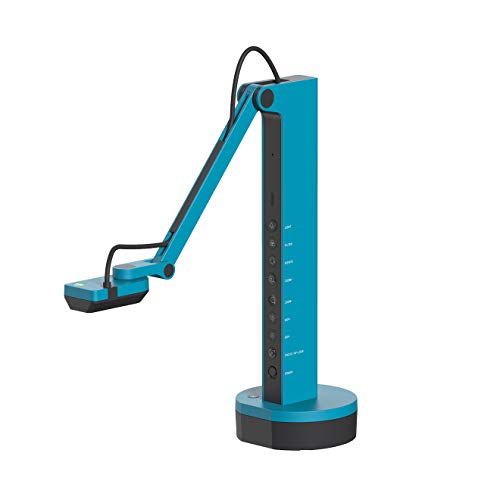
- Wi-Fi, HDMI, and USB connectivity
- 9–12-hour battery life with 33-foot wireless range
- Near-4K-quality USB capture
Best For: Wireless classrooms and flexible presentations
Best Budget Classroom Option
PAKOTOO 5MP USB Document Camera

- A3 document capture with flexible arm
- Three-level LED lighting and exposure control
- Works as a webcam with major computer platforms
Best For: Budget-conscious teachers and remote instruction
Best Wide-Angle 4K Pick
IPEVO V4K PRO 120 Document Camera

- 120-degree lens for tabloid-size coverage
- 4K capture with 8MP Sony CMOS sensor
- AI noise reduction and USB plug-and-play setup
Best For: Detailed demonstrations and large-format documents
Compact Classroom Pick
PAKOTOO 8MP A3 Document Camera

- A3 coverage with one-touch autofocus
- Foldable, multi-joint design
- USB-only; no HDMI or iPad support
Best For: Portable computer-based classroom teaching
Audio-Ready Teaching Choice
THUSTAR 8MP 4K Document Camera

- 8MP/2448P video at up to 30fps
- Built-in dual microphones
- Foldable A3 visualiser with ring light
Best For: Live teaching with integrated voice capture
Plug-and-Play Visualiser
Kitchbai 4K USB Document Camera

- USB-C setup for major computer platforms
- 8MP/2448P video at 30fps
- Foldable A3 design with dual microphones
Best For: Distance education and web conferencing
Best Portable 4K Pick – OKIOCAM S-4K
The OKIOCAM S-4K is a portable document camera for teachers who want detailed live images without taking up much desk space. Its 8MP Sony Exmor R sensor supports UHD capture, while autofocus, physical controls, and included OKIOPoint software add flexibility for lessons and demonstrations.
Best For: Teachers needing a compact camera for letter-size materials, distance learning, and interactive presentations.
Pros:
- Captures up to 3264 x 2448 resolution with an 8MP Sony Exmor R sensor.
- Streams at up to 30fps in Full HD for responsive demonstrations.
- Includes AI-tracking OKIOPoint, annotation tools, recording, snapshots, and timelapse features.
- Portable design supports letter-size materials in landscape orientation.
Cons:
- Maximum-resolution streaming is limited to 15fps.
- USB 2.0 connectivity may be less convenient for newer setups.
Choose this document camera when portability and teaching-focused software matter as much as image quality. Its compact build and smart pointer make it particularly practical for classrooms with limited space.
Best Large-Format Choice – INSWAN INS-2
The INSWAN INS-2 is a high-resolution document camera designed for large materials, artwork, and two-page spreads. It combines a 13MP Sony sensor with 4K video, a flexible multi-joint arm, built-in lighting, and software tools for professional classroom presentations.
Best For: Educators and art instructors displaying A3 documents, artwork, and large-format materials.
Pros:
- Captures 4K video at 3840 x 2160 and up to 30fps.
- 13MP sensor and multi-joint arm support detailed A3-size presentations.
- Includes LED lighting, anti-glare sheet, dual autofocus, brightness control, and macro focus.
- Documate software offers annotation, recording, whiteboard tools, scanning, and OCR.
Cons:
- At 2.3 pounds, it is less portable than smaller document cameras.
- Its listed 4K capture speed is 15fps in the specifications.
The INS-2 is a strong fit when coverage and presentation features take priority over compactness. Its A3 support and bundled software make it well suited to art instruction and large-screen teaching.
Best Simple UHD Performer – IPEVO V4K
The IPEVO V4K is a straightforward USB document camera for live demonstrations, online teaching, and web conferencing. Its 8MP Sony CMOS sensor delivers UHD images, while fast focusing and a multi-jointed stand help keep presentations moving.
Best For: Teachers and remote presenters who want high-resolution capture with broad Mac, Windows, and Chromebook compatibility.
Pros:
- Captures UHD images up to 3264 x 2448 pixels.
- Streams at up to 30fps in Full HD and up to 15fps at maximum resolution.
- Fast focusing helps reduce interruptions when switching between materials.
- Multi-jointed stand and 13.46 x 10.04-inch maximum shooting area support flexible setups.
Cons:
- It has no optical or digital zoom.
- The attached USB cable may limit placement flexibility.
This document camera keeps the feature set focused on clear capture and dependable live streaming. It is a sensible option for users who do not need built-in lighting, microphones, or advanced bundled controls.
Best Feature-Rich Classic – INSWAN INS-1
The INSWAN INS-1 combines an 8MP camera with practical presentation features for classrooms and video calls. Autofocus, built-in LED lighting, an anti-glare sheet, brightness controls, and a microphone make this document camera useful across varied teaching environments.
Best For: Desktop teaching setups that need lighting, audio, macro capture, and broad software compatibility.
Pros:
- Captures up to 3264 x 2448 pixels and streams at 30fps across listed resolutions.
- Built-in LED, anti-glare sheet, and seven-step brightness control help with difficult lighting.
- Autofocus and macro capability support objects as close as 3.9 inches.
- Documate software includes zoom, annotation, recording, snapshots, and image adjustments.
Cons:
- It uses USB-A, which may require an adapter with some newer devices.
- The 8MP sensor is lower resolution than the 13MP INS-2.
The INS-1 is a versatile document camera for users who value useful extras over a minimalist design. Its lighting, microphone, and software package make it well equipped for everyday lessons and online conferencing.
Best Wireless Pick – IPEVO VZ-X Wireless 8MP Document Camera
The IPEVO VZ-X is a versatile document camera for classrooms, presentations, and hybrid meetings. It supports Wi-Fi, HDMI, and USB connections, letting you display materials on computers, mobile devices, projectors, TVs, and monitors without being limited to one setup.
Best For: Teachers and presenters who want wireless flexibility, long battery life, and multiple connection options.
Pros:
- Offers Wi-Fi, HDMI, and USB connectivity for broad device compatibility.
- Captures up to 1920 x 1080 in Wi-Fi and HDMI modes and near-4K-quality stills in USB mode.
- Provides 9–12 hours of battery life and up to a 33-foot wireless range.
- Swiveling head, multi-jointed stand, and built-in LED support flexible positioning.
Cons:
- At 2.6 pounds, it is less lightweight than simpler USB-only models.
- Manual focus may require adjustment during use.
- Wireless and HDMI video output is limited to HD resolution.
The VZ-X stands out when connectivity and mobility matter more than a simple plug-in workflow. Its battery, flexible stand, and broad compatibility make it a strong choice for active classrooms and presentations.
Best Budget Classroom Option – PAKOTOO 5MP USB Document Camera
This PAKOTOO document camera is a practical USB model for teachers, remote instruction, and video calls. Its flexible arm, A3 capture area, adjustable lighting, and webcam functionality make it useful for showing worksheets, books, and objects during lessons or meetings.
Best For: Teachers and remote presenters who need an affordable, flexible USB document camera with built-in lighting.
Pros:
- Captures documents up to A3 size with an adjustable hose-style arm.
- Works as both a document camera and webcam with Windows, Mac, and Chromebook systems.
- Includes three LED light levels and five-step exposure adjustment for challenging lighting.
- Supports autofocus, image mirroring, and Full HD streaming up to 30 fps.
Cons:
- USB-only connectivity does not provide HDMI or wireless output.
- It is not plug and play; users must select “USB Camera” in the computer’s system.
- The 5MP sensor offers less resolution than the IPEVO models in this roundup.
The PAKOTOO focuses on classroom essentials rather than advanced connectivity. Its A3 coverage, flexible positioning, and lighting controls make it a useful choice when value and teaching-focused features are the priorities.
Best Wide-Angle 4K Pick – IPEVO V4K PRO 120 Document Camera
The IPEVO V4K PRO 120 is a USB document camera designed for detailed, expansive views. Its 120-degree lens and adjustable arm can cover tabloid-size documents and larger objects, while 4K capture, autofocus, and AI noise reduction support presentations and video conferencing.
Best For: Users who need wide coverage and high-detail USB video for documents, demonstrations, or online meetings.
Pros:
- 120-degree wide-angle lens captures tabloid-size documents and larger objects.
- Combines 4K resolution, an 8MP Sony CMOS sensor, built-in LED, and swift autofocus.
- AI noise reduction helps reduce background ambient noise during calls and presentations.
- USB plug-and-play compatibility supports Windows, Mac, Chromebooks, Zoom, Meet, Skype, and Teams.
Cons:
- USB connectivity does not offer the wireless or HDMI options found on the VZ-X.
- At 860 grams, it is heavier than the compact PAKOTOO model.
- The camera has no image stabilization.
The V4K PRO 120 is a strong fit for users who regularly show large materials or need a broad field of view. It trades connection variety for a straightforward USB workflow and higher-detail, wide-angle capture.
Compact Classroom Pick – PAKOTOO 8MP A3 Document Camera
The PAKOTOO document camera is a practical choice for teachers who need to display A3 or A4 pages, small objects, and 3D materials during online lessons. Its foldable, multi-joint design saves space, while hardware controls provide image reversal, brightness adjustment, exposure adjustment, and one-touch autofocus.
Best For: Teachers and remote instructors who want a portable USB document camera with flexible positioning and built-in lighting.
Pros:
- Captures areas up to 16.5 x 11.6 inches for A3 materials.
- One-touch autofocus can capture objects as close as 3.94 inches.
- Foldable multi-joint design supports multiple viewing angles.
- Three LED brightness levels and 10 exposure adjustments help with difficult lighting.
Cons:
- Uses USB 2.0 and does not support HDMI or zoom.
- Not compatible with iPad devices.
- Requires selecting “USB Camera” manually because it is not fully plug and play.
The PAKOTOO stands out for its compact design and direct button controls. It is best suited to computer-based teaching setups where A3 coverage matters more than HDMI connectivity or advanced zoom features.
Audio-Ready Teaching Choice – THUSTAR 8MP 4K Document Camera
The THUSTAR document camera combines 8MP imaging, 30fps video, built-in dual microphones, and a foldable A3-size design. It suits live demonstrations and distance education, with manual image inversion, adjustable brightness, ring lighting, and one-touch autofocus for close-up materials.
Best For: Teachers and presenters who want a document camera that combines visual demonstrations with built-in audio for video calls.
Pros:
- Provides 8MP/2448P output with 30fps live transmission.
- Dual microphones are designed to reduce noise and improve sound quality.
- Fourteen LED ring-light beads offer three brightness levels.
- Foldable construction covers up to 16.5 x 11.6 inches and supports multi-angle positioning.
Cons:
- Connects through USB 2.0 rather than HDMI.
- The listing describes autofocus as one-touch, so it may require manual refocusing when needed.
- Some listed software and platform compatibility may depend on the host computer.
With its dual microphones and adjustable ring light, the THUSTAR is a well-rounded document camera for live lessons and web conferencing. Its feature set is particularly useful when one USB device needs to handle both classroom visuals and voice capture.
Plug-and-Play Visualiser – Kitchbai 4K USB Document Camera
The Kitchbai document camera is designed for teachers and presenters who want a quick USB setup across Windows, macOS, and Chrome OS. Its 8MP sensor delivers 2448P video at 30fps, while the foldable arm, adjustable lighting, image inversion, dual microphones, and close-focus capability support a broad range of demonstrations.
Best For: Distance education and web conferencing users seeking a foldable visualiser with broad computer compatibility and integrated microphones.
Pros:
- USB-C cable is described as supporting plug-and-play operation.
- Supports Windows 7/8/10/11, macOS 10.11 or later, and Chrome OS.
- Captures A3-size areas up to 16.5 x 11.6 inches at 30fps.
- Includes dual microphones, three brightness levels, and one-touch autofocus.
Cons:
- The supplied specifications describe 2448P output rather than native 4K resolution.
- USB connectivity may not suit setups that require HDMI output.
- Brightness adjustment is limited to three levels.
The Kitchbai is a strong convenience-focused option for users moving between compatible computers. Its plug-and-play positioning, foldable construction, and built-in audio make it well suited to online lessons, demonstrations, and video meetings.
How We Picked the Best Document Cameras
We focused on features that affect everyday teaching and presenting: image resolution, autofocus performance, capture size, lighting, microphone quality, portability, and connection options. We also considered compatibility with Windows, macOS, Chromebooks, web conferencing platforms, classroom software, and common USB workflows.
Models with 4K or high-resolution sensors can show fine print and detailed diagrams more clearly, while adjustable lights help when documents are used in dim rooms. Wireless and HDMI support can simplify more advanced classroom or presentation setups, but a straightforward USB model may be easier for most users.
Quick Comparison
- Best for straightforward USB teaching: Choose a plug-and-play model with a flexible arm and built-in light.
- Best for fine detail: Look for 4K output, a high-resolution sensor, and reliable autofocus.
- Best for larger materials: Select an A3-compatible camera if you regularly display books, worksheets, maps, or demonstrations.
- Best for flexible connectivity: Consider a model with USB, HDMI, or Wi-Fi connections.
- Best for interactive lessons: Built-in microphones, image rotation, and pointer or annotation features can reduce setup friction.
Key Buying Factors for a Document Camera
Resolution and Focus
Resolution affects how sharply small text, handwriting, and objects appear. An 8MP camera is suitable for many classroom tasks, while 4K models are a better fit for detailed demonstrations or large displays. Autofocus is particularly useful when switching between pages and three-dimensional objects.
Capture Area and Stand Design
Check whether the camera supports A4 or larger A3 materials. A foldable stand is convenient for storage and travel, while a broader, adjustable arm makes it easier to frame books, experiments, and objects. Make sure the base remains stable when the arm is repositioned.
Lighting, Audio, and Controls
Built-in LED lighting can reduce shadows and improve readability, especially in classrooms with uneven lighting. If the camera will replace a webcam, compare microphone quality and noise-reduction features. Image inversion, rotation, and quick controls are useful when presenting from unusual angles.
Connectivity and Compatibility
USB is usually the simplest option for computers and Chromebooks, but confirm the required port and operating-system support. HDMI can connect directly to a display, while Wi-Fi allows more freedom from cables. Check compatibility with the specific video or teaching software you use.
Who Should Buy Which Document Camera?
Teachers who want simplicity should choose a USB Document Camera with autofocus, integrated lighting, and a foldable design. Remote instructors and presenters may prefer a model that also works as a webcam and includes a capable microphone. Users showing books, posters, or larger worksheets should prioritize A3 coverage and a flexible stand.
Schools seeking installation flexibility can benefit from HDMI or wireless connectivity, while detail-focused users should spend more on 4K output, a quality sensor, and responsive autofocus. Before buying, verify that the included cable, software, and mounting arrangement match your existing classroom or desk setup.