Printing shipping labels from a Mac should be quick, dependable, and free from constant ink and alignment problems. The right thermal printer can streamline orders for an online shop, home business, or busy shipping desk.
These 10 picks cover compact Bluetooth models, straightforward USB printers, flexible wireless options, and durable commercial-grade machines. Use the guide below to match connectivity, software compatibility, speed, and label volume to your workflow.
Best 10 Shipping Label Printers for Mac Picks for 2026
Best Wireless Starter
KNAON Bluetooth 4x6 Label Printer

- Mac support through USB or FlashLabel Pro
- Bluetooth, USB, and app-based label printing
- Includes templates and supports multiple label sizes
Best For: Small businesses using Mac and mobile devices
Best Network Connectivity
Brother QL-820NWB Professional Label Printer

- Bluetooth, Ethernet, wireless, and USB connectivity
- Up to 110 standard address labels per minute
- LCD enables standalone operation
Best For: Shared offices and networked address-label workflows
Best Mac USB Workhorse
Arkscan 2054A 4x6 Shipping Printer
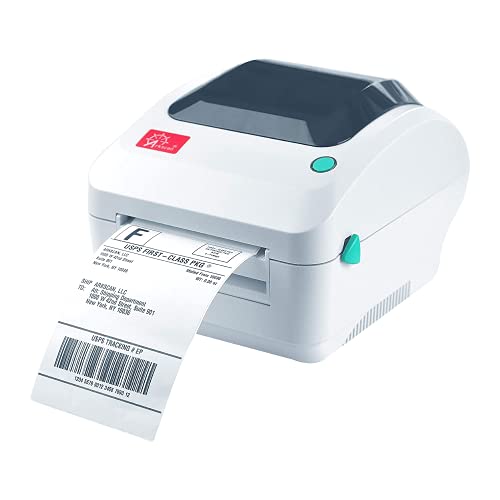
- USB support for Mac and macOS
- Handles roll and fanfold 4x6 labels
- Supports major marketplaces and carriers
Best For: Mac-based sellers using a wired shipping station
Best Compact Built-In Storage
Omezizy D450BT Bluetooth Label Printer

- Bluetooth and USB support for macOS
- Built-in bin stores up to 250 labels
- Prints up to 72 labels per minute without ink
Best For: Small Mac workspaces needing integrated label storage
Best Mac-Compatible USB Pick
Rollo USB Shipping Label Printer

- Mac 10.9+ USB compatibility
- One 4x6 label per second
- Supports major shipping platforms
Best For: Fast, wired Mac-based shipping and custom label printing
Best Wireless Mac Option
JADENS Bluetooth Thermal Shipping Label Printer

- Bluetooth and USB for Mac
- Ink- and toner-free 203 DPI printing
- Supports roll and fanfold labels
Best For: Small businesses wanting flexible wireless or wired printing
Best for Growing Operations
Zebra ZD421 Thermal Shipping Label Printer

- Prints up to 6 inches per second
- USB, Ethernet, and Bluetooth
- Supports ZPL and EPL workflows
Best For: Retail, warehouse, and laboratory environments
Best Wi-Fi Pick
Rollo Wireless Shipping Label Printer

- AirPrint support for Mac, iPhone, and iPad
- Fast 150 mm/s direct thermal printing
- Works with major marketplaces and shipping platforms
Best For: Mac users who want wireless label printing
Best Compact Option
Nelko Bluetooth Thermal Shipping Label Printer

- USB printing support for macOS
- Compact design for small workspaces
- Prints up to 72 4x6 labels per minute
Best For: Mac users seeking a compact USB label printer
Best Flexible Label Sizes
Rongta Bluetooth Shipping Label Printer

- Mac driver support for macOS 10.11 and newer
- Automatic detection for varied label sizes
- Bluetooth app printing for iOS and Android
Best For: Businesses printing shipping and specialty labels
Best Wireless Starter – KNAON Bluetooth 4×6 Label Printer
If you want shipping label printers for Mac with both wireless and wired options, the KNAON is a flexible compact choice. It supports macOS through USB or the FlashLabel Pro app, prints up to 180 mm/s, and works with common selling and shipping platforms.
Best For: Small businesses and home sellers who want Mac, mobile, and Windows compatibility in a portable printer.
Pros:
- Supports macOS through USB or the FlashLabel Pro app.
- Offers Bluetooth and USB connectivity, plus a built-in USB drive with drivers and tutorials.
- Prints 4×6 labels and other media from 1.5 to 4.2 inches wide.
- Includes more than 3,000 templates, 5,000 icons, and 100 fonts in the app.
Cons:
- Bluetooth printing requires the FlashLabel Pro app rather than direct device pairing.
- Shipping-platform labels must be saved as PDFs and imported into the app.
The KNAON stands out for its broad app-based customization and compact design. It is a practical fit if your workflow includes a Mac plus phones or tablets, though the app-based Bluetooth process adds an extra step.
Best Network Connectivity – Brother QL-820NWB Professional Label Printer
For shoppers comparing shipping label printers for Mac in a shared office, the Brother QL-820NWB emphasizes connectivity. It combines Bluetooth, Ethernet, wireless networking, and USB with a monochrome LCD for standalone operation.
Best For: Offices and multi-device workgroups that need network-ready label printing and fast address-label output.
Pros:
- Provides Bluetooth, Ethernet, 802.11b/g/n wireless, and USB connectivity.
- Prints up to 110 standard address labels per minute.
- LCD screen supports standalone use without relying entirely on a computer.
- Can print black-and-red labels with compatible DK-2251 tape.
Cons:
- Its listed maximum media size is smaller than standard 4×6 shipping labels.
- It is a monochrome label printer, with color limited to black-and-red compatible media.
The QL-820NWB is better suited to address labels and office labeling than conventional 4×6 carrier labels. Its networking options and LCD make it appealing where several devices or users need access.
Best Mac USB Workhorse – Arkscan 2054A 4×6 Shipping Printer
The Arkscan 2054A is a straightforward option among shipping label printers for Mac, using a USB connection with macOS, Windows, Chromebook, and Android systems. It supports roll and fanfold paper, common 4×6 formats, and printing speeds up to 5 inches per second.
Best For: Online sellers who want a USB-connected Mac printer with broad shipping-platform support and flexible label loading.
Pros:
- Supports Apple Mac computers and macOS through USB.
- Works with platforms and services including Amazon, eBay, Etsy, Shopify, USPS, UPS, FedEx, and ShipStation.
- Accepts both roll and fanfold labels, including common 4×6 shipping formats.
- Prints at up to 5 inches per second without ink or toner.
Cons:
- Connectivity is USB rather than wireless.
- The included BarTender UltraLite design software is for Windows only.
If your Mac shipping station stays near the printer, the 2054A offers useful format flexibility and extensive platform compatibility. Its USB-only setup is less convenient for wireless workflows, but its support resources and one-year limited warranty add practical value.
Best Compact Built-In Storage – Omezizy D450BT Bluetooth Label Printer
The Omezizy D450BT combines Mac compatibility with a space-saving built-in label compartment. For shoppers seeking shipping label printers for Mac, it offers Bluetooth and USB connections, 203 DPI output, automatic alignment, and room for up to 250 internal 4×6 labels.
Best For: Home offices and small shipping desks where compact storage and wireless Mac printing are priorities.
Pros:
- Pairs with macOS through Bluetooth and also supports USB.
- Built-in compartment holds an internal roll of up to 250 4×6 labels.
- Supports label widths from 1 to 4.6 inches for shipping, barcode, and product labels.
- Prints at up to 72 labels per minute and requires no ink or toner.
Cons:
- Its 203 DPI resolution is lower than some office-oriented label printers.
- Bluetooth setup may require using the associated app or software workflow.
The D450BT is a convenient choice when desk space and label storage matter. Its built-in bin reduces clutter, while Bluetooth and USB give Mac users flexibility for either wireless or direct printing.
Best Mac-Compatible USB Pick – Rollo USB Shipping Label Printer
The Rollo USB is a practical choice among shipping label printers for Mac if you want a straightforward wired setup. It works with Mac 10.9 and newer, prints 4×6 labels at up to one per second, and uses direct thermal printing instead of ink or toner.
Best For: Mac users who want fast USB printing for shipping labels and other custom labels.
Pros:
- Compatible with Mac 10.9 and newer through USB.
- Prints 4×6 labels at up to 150 mm/s with a 203 DPI print head.
- Works with major shipping platforms and marketplaces, including Amazon, Shopify, Etsy, and eBay.
- Supports label widths from 1.57 to 4.1 inches for barcodes, stickers, and product labels.
Cons:
- Uses a wired USB connection rather than wireless printing.
- Limited to monochrome direct thermal output.
The Rollo stands out for reliable Mac USB compatibility, broad platform support, and versatile label sizing. Its included Rollo Ship app may also help streamline postage and shipping workflows.
Best Wireless Mac Option – JADENS Bluetooth Thermal Shipping Label Printer
The JADENS JD268BT is a flexible option for shipping label printers for Mac, combining Bluetooth and USB connectivity. Mac users can print wirelessly through Bluetooth or use USB, while the 203 DPI direct thermal system avoids ink and toner.
Best For: Small businesses that want wireless Mac printing with the option to switch to USB.
Pros:
- Supports Bluetooth printing on Mac and USB printing on Mac OS 10.9 and newer.
- Works with both fanfold and roll labels from 1.57 to 4.1 inches wide.
- Compatible with shipping platforms such as ShipStation, Shippo, Shopify, Amazon, and eBay.
- Includes setup and troubleshooting resources plus a one-year warranty.
Cons:
- Labels need to be identified and calibrated when changing label types.
- Bluetooth printing from phones requires the JADENS app rather than direct Bluetooth printing.
Choose the JADENS if wireless convenience matters but you still want a USB fallback. Its broad label-size range and marketplace compatibility make it well suited to home offices and online sellers.
Best for Growing Operations – Zebra ZD421 Thermal Shipping Label Printer
The Zebra ZD421 is a business-focused option among shipping label printers for Mac, with USB, Ethernet, and Bluetooth connectivity. It prints direct thermal labels at up to 6 inches per second and supports established Zebra printer languages for compatibility with existing workflows.
Best For: Retail, warehouse, and laboratory operations that need a durable, expandable label printer.
Pros:
- Direct thermal printing requires no ink or toner and supports 203 DPI output.
- Offers USB, Ethernet, and Bluetooth connectivity.
- Supports EPL and ZPL languages and can emulate other printer languages.
- Includes a two-year manufacturer warranty and field-upgradeable media and wireless options.
Cons:
- Its business-oriented features may be more than a casual home shipper needs.
- The supplied specifications identify direct connectivity options but do not specifically confirm a Mac operating-system version.
The ZD421 is the strongest fit when speed, network connectivity, and future expansion matter more than a simple plug-and-print setup. Verify Mac software and driver support for your exact configuration before buying.
Best Wi-Fi Pick – Rollo Wireless Shipping Label Printer
If you want shipping label printers for Mac that work wirelessly, the Rollo Wireless is a particularly flexible option. It supports AirPrint for direct printing from a Mac, iPhone, or iPad, while USB provides a wired alternative.
Best For: Sellers who want convenient Wi-Fi printing across Apple devices and broad marketplace compatibility.
Pros:
- AirPrint-enabled Wi-Fi printing from Mac, iPhone, and iPad.
- Prints one 4×6 label per second at 203 DPI without ink or toner.
- Works with major shipping platforms and marketplaces, including Amazon, Shopify, Etsy, and eBay.
- Supports label widths from 1.57 to 4.1 inches for shipping and custom labels.
Cons:
- Wireless setup may be more involved than a basic USB-only printer.
- Its 203 DPI resolution is designed for standard monochrome labels rather than detailed graphics.
The Rollo stands out for Mac users who value wireless convenience. Its AirPrint support, fast output, and compatibility with common shipping services make it a strong all-around choice for home-based sellers and small businesses.
Best Compact Option – Nelko Bluetooth Thermal Shipping Label Printer
The Nelko PL70E is a compact choice among shipping label printers for Mac, with USB connectivity for macOS and included USB-C hardware for Mac setups. It also supports app-based printing on compatible mobile devices.
Best For: Home sellers and small offices that need a space-saving 4×6 printer with flexible label-size support.
Pros:
- Supports Mac OS through USB and includes a USB-C cable for Mac.
- Prints up to 72 4×6 labels per minute at 203 DPI.
- Handles fanfold and roll labels from 1.54 to 4.1 inches wide.
- Compact design is suitable for limited desk space.
Cons:
- Mac users cannot print through Bluetooth; macOS requires a USB connection.
- Labels generally need to be saved as a PDF and uploaded to the Nelko app for printing.
This printer makes sense if compact size and straightforward USB printing matter most. Mac users should plan on a wired workflow, while iOS and Android users can use the Nelko app for Bluetooth printing.
Best Flexible Label Sizes – Rongta Bluetooth Shipping Label Printer
The Rongta RP425 is a versatile option among shipping label printers for Mac, combining Mac driver support with Bluetooth printing through its mobile app. Automatic label identification helps simplify switching between common label formats.
Best For: Small businesses that print shipping, barcode, QR code, and other labels across Mac computers and mobile devices.
Pros:
- Supports Mac OS 10.11 and newer through downloadable driver software.
- Bluetooth connectivity works with iOS and Android devices through the Rongta app.
- Automatically detects and feeds labels from 0.98 to 4.37 inches wide.
- Prints at up to 150 mm/s with 203 DPI resolution.
Cons:
- Mac setup requires downloading the driver from Rongta’s official website.
- Bluetooth printing is app-based rather than a direct computer Bluetooth connection.
The RP425 is a practical pick when label variety is important. Its wide media range and automatic detection are useful for businesses that print more than standard 4×6 shipping labels, while Mac drivers provide a conventional desktop setup.
How We Picked the Best Shipping Label Printers for Mac
We focused on printers that support common 4×6 shipping labels and offer a practical connection method for Mac users. The selection includes USB, Bluetooth, and Wi-Fi models, along with printers designed for higher-volume commercial use. We also considered compatibility with major marketplaces and shipping services, setup convenience, print quality, portability, included accessories, and the ongoing cost of using direct thermal labels instead of ink.
Because Mac compatibility can vary by macOS version, browser, and shipping platform, buyers should confirm current driver, app, and platform support before purchasing. A printer that works with a phone or Windows computer may not provide the same experience on a Mac.
Quick Comparison
| Printer type | Best for | Main advantage |
|---|---|---|
| USB thermal | Dedicated shipping stations | Simple, stable wired connection |
| Bluetooth thermal | Flexible home or mobile use | Wireless printing from compatible devices |
| Wi-Fi thermal | Shared workspaces | Network access from multiple devices |
| Commercial-grade thermal | Frequent, high-volume shipments | Durability and consistent throughput |
Key Buying Factors for Shipping Label Printers for Mac
Mac and Platform Compatibility
Check whether the printer includes macOS drivers or supports direct printing through your preferred browser, shipping software, or marketplace. Compatibility with services such as Shopify, Etsy, eBay, Amazon, ShipStation, UPS, and USPS may depend on the software generating the label rather than the printer alone.
Connection Type
USB is usually the safest choice for a single Mac and a fixed workstation. Bluetooth can reduce cable clutter and suit occasional or portable shipping, while Wi-Fi is more convenient when several computers or devices need access. Confirm whether the model supports Mac over the connection you plan to use; some Bluetooth printers are primarily optimized for mobile apps.
Label Format and Print Quality
Most carrier labels use a 4×6-inch format, but verify the supported label width and whether the printer automatically detects gaps or black marks. Clear, properly aligned barcodes are essential for reliable scanning. Direct thermal printers do not require ink, toner, or ribbons, but they require compatible thermal labels.
Volume, Size, and Maintenance
For occasional orders, a compact model may be enough. High-volume sellers should prioritize reliable feeding, consistent print speed, durable construction, and easy access to replacement labels. A built-in label holder can save desk space, while portable models are useful for pop-up operations or limited work areas.
Who Should Buy Which Shipping Label Printers for Mac?
- Choose a USB model if one Mac handles most of your shipping and reliability matters more than wireless convenience.
- Choose Bluetooth if you want a compact setup or need to print from compatible phones and tablets as well as a computer.
- Choose Wi-Fi if multiple people or devices share the same shipping area.
- Choose a commercial-grade printer if you ship frequently and need long-term durability and steady output.
- Choose a printer with a label bin or portable design if workspace organization and mobility are priorities.
Before ordering, confirm macOS support, the included accessories, maximum label width, and the seller’s current setup instructions. Those details matter more than headline print speed when building a dependable Mac-based shipping workflow.