The best microcontroller kits for beginners make it easier to move from blinking an LED to building useful sensors, displays, robots, and connected devices. The right kit combines a suitable board with clear lessons, practical components, and room to grow.
This roundup compares 10 options built around Arduino, Raspberry Pi Pico, micro:bit, and ESP32 platforms. Use the guide below to match the kit’s learning path, included hardware, and connectivity features to your goals.
Best 10 Microcontroller Kits for Beginners Picks for 2026
Best Complete Arduino Learning Path

- Original Arduino UNO R4 WiFi included
- 300+ components and 50 guided projects
- 100+ video lessons for Arduino and IoT
Best For: Beginners who want a structured Arduino-to-IoT learning path
Best for Large Hardware Projects
ELEGOO Mega 2560 R3 Starter Kit

- 35+ guided electronics projects
- Mega board with 54 digital I/O pins
- 200+ sensors, displays, motors, and modules
Best For: Learners building larger, multi-component Arduino projects
Best for MicroPython and IoT
SunFounder Raspberry Pi Pico W Kit

- 450+ components and 117 projects
- Supports MicroPython, C/C++, and Piper Make
- Pico W includes Wi-Fi and Bluetooth
Best For: Beginners exploring wireless projects and multiple coding languages
Best Beginner-Friendly Educational Kit
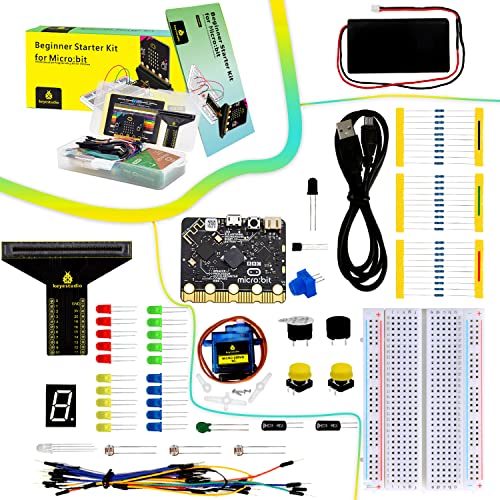
- BBC micro:bit V2.21 included
- At least 18 guided beginner projects
- Includes sensors, display, servo, and breadboard
Best For: Teens and first-time hobbyists learning with micro:bit
Most Complete UNO Learning Kit

- 30+ guided electronics projects
- 200+ components across 63 types
- Pre-soldered modules and organized storage
Best For: Arduino beginners who want maximum project variety
Multi-Language Pico Learning Kit
SunFounder Raspberry Pi Pico Kit
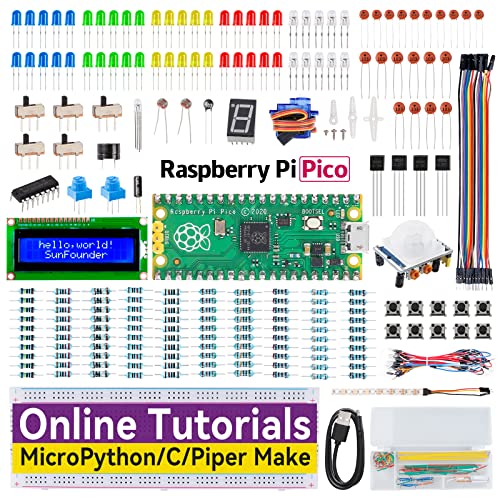
- 40 guided online projects
- 280+ components included
- MicroPython, C/C++, and Piper Make support
Best For: Learners exploring Pico programming at multiple levels
Budget Arduino Starter Set
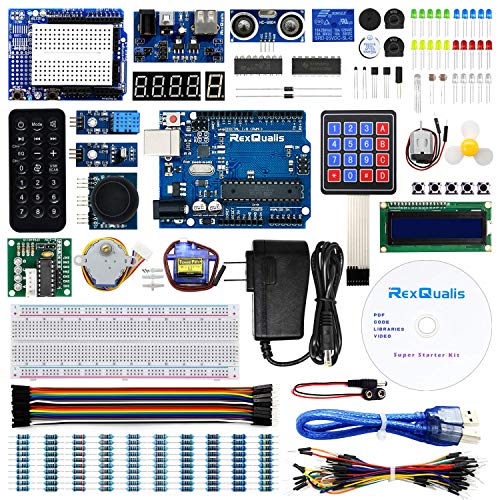
- Arduino UNO R3-compatible board
- 9V power adapter included
- Labeled parts in a plastic storage box
Best For: New Arduino users looking for an economical starting kit
Best for Guided Mega Projects

- 16 guided Arduino electronics projects
- 54 digital I/O pins with analog and PWM support
- Includes display, motor, relay, sensors, and breadboard
Best For: Structured learning and larger Arduino prototypes
Best for Organized STEM Learning

- 83 labeled components included
- 12 progressive tutorials with diagrams and code
- Designed for college STEM and self-study
Best For: Classroom learning and organized first projects
Best for Beginner IoT Projects

- Dual-core ESP-32 with Wi-Fi and Bluetooth 4.2
- 35-plus modules and components included
- 30-plus guided projects with code and diagrams
Best For: Wireless electronics and introductory IoT builds
Best Complete Arduino Learning Path – SunFounder Elite Explorer Kit
For shoppers comparing microcontroller kits for beginners, the SunFounder Elite Explorer Kit stands out as a highly structured Arduino option. It combines the original Arduino UNO R4 WiFi with more than 300 components, 50 projects, and over 100 video lessons covering electronics, coding, and IoT.
Best For: Beginners, students, teachers, and aspiring makers who want guided Arduino and IoT projects with built-in Wi-Fi and Bluetooth.
Pros:
- Includes the original Arduino UNO R4 WiFi with a 32-bit processor, Wi-Fi, and Bluetooth.
- Offers 300+ components and 50 projects spanning basic electronics, fun builds, and IoT.
- Provides more than 100 video lessons, open-source code, and beginner-focused technical support.
Cons:
- The large number of components and project options may feel overwhelming at first.
- Its strongest learning path is centered on the Arduino ecosystem and Arduino C++.
This is a strong choice if you want one kit that can carry a beginner from simple circuits into connected projects. The UNO R4 WiFi and extensive lesson library also leave room for more advanced experimentation.
Best for Large Hardware Projects – ELEGOO Mega 2560 R3 Starter Kit
The ELEGOO Mega 2560 R3 is one of the more hardware-rich microcontroller kits for beginners, especially for learners who want to combine many sensors, displays, and motors. Its 35+ guided projects introduce practical builds such as RFID access systems, environmental monitors, alarms, and motion-controlled projects.
Best For: STEM learners, coding clubs, and makers who need plentiful I/O pins and components for larger Arduino-compatible projects.
Pros:
- The MEGA 2560 R3 provides 54 digital I/O pins, 16 analog inputs, 15 PWM outputs, and four hardware serial ports.
- Includes 200+ components such as RFID, RTC, DHT11, PIR, ultrasonic, motor, relay, display, and keypad modules.
- Pre-soldered modules, a breadboard, storage case, and parts box support repeatable project work.
Cons:
- The kit is recommended for ages 13 and up, so it may be less suitable for younger children.
- Its larger board and extensive parts selection can be more than needed for simple starter circuits.
Choose this kit when expansion capacity matters more than a compact setup. The Mega’s generous I/O and included motors, displays, and sensors make it particularly useful for multi-part builds.
Best for MicroPython and IoT – SunFounder Raspberry Pi Pico W Kit
The SunFounder Raspberry Pi Pico W Ultimate Starter Kit is a versatile choice among microcontroller kits for beginners who want to explore connected devices and multiple programming languages. It includes more than 450 items, 117 projects, and support for MicroPython, C/C++, and Piper Make.
Best For: Beginners interested in Raspberry Pi Pico W projects, wireless IoT experiments, and learning more than one programming language.
Pros:
- Includes a Raspberry Pi Pico W with Bluetooth and 802.11n Wi-Fi connectivity.
- Provides 450+ components and 117 projects involving sensors, actuators, LEDs, LCDs, and other hardware.
- Supports MicroPython, C/C++, and Piper Make, with 27 video tutorials and community assistance.
Cons:
- The broad language and project coverage may require more self-direction than a single-path kit.
- Its wireless and IoT capabilities may be unnecessary for learners focused only on basic circuits.
This kit is a strong fit for learners who want to move beyond introductory LEDs and buttons into wireless projects. Its large component inventory and language flexibility provide substantial room to grow.
Best Beginner-Friendly Educational Kit – KEYESTUDIO Micro:bit V2 Kit
The KEYESTUDIO Micro:bit Basic Starter Kit offers an approachable entry into programming and electronics through the BBC micro:bit V2.21. It includes a breakout adapter, breadboard, common components, and tutorials for at least 18 projects, making it a practical option for teens and first-time hobbyists.
Best For: Teens, electric beginners, and hobbyists who want an accessible micro:bit-based introduction to sensors, displays, and simple robotics.
Pros:
- Includes the BBC micro:bit V2.21 with Bluetooth, accelerometer, compass, buttons, and a 5×5 LED matrix.
- Offers at least 18 projects using LEDs, sensors, displays, a servo, buzzer, and breadboard.
- Detailed online tutorials cover wiring, drivers, test code, and step-by-step examples.
Cons:
- The project selection and included hardware are more limited than those of the larger 200- or 450-component kits.
- It is designed around the BBC micro:bit ecosystem rather than Arduino boards.
This is a sensible pick when ease of entry and clear educational projects are priorities. The built-in micro:bit features reduce the amount of external hardware needed for early experiments, while the included accessories support gradual expansion.
Most Complete UNO Learning Kit – ELEGOO UNO R3 Starter Kit
For beginners comparing microcontroller kits for beginners, the ELEGOO UNO R3 Project Most Complete Starter Kit offers a broad, guided introduction to Arduino-compatible electronics. Its 30-plus projects, 200-plus components, pre-soldered modules, and organized storage make it practical for progressing from simple LED circuits to sensors, displays, RFID, and motor control.
Best For: Beginners, classrooms, coding clubs, and hobbyists who want a large Arduino-based kit with structured projects and varied components.
Pros:
- Includes more than 200 components across 63 types and over 30 guided projects.
- Pre-soldered modules and a solderless breadboard reduce setup friction for new users.
- Includes a PDF tutorial, example code, storage case, USB cable, and power accessories.
- Supports varied experiments involving displays, sensors, RFID, relays, servos, and stepper motors.
Cons:
- The large component assortment may feel overwhelming at first.
- The included power supply should not be used above 9V.
This is a strong choice when variety and a guided learning path matter more than a compact kit. Beginners can follow the included lessons, then adjust code and circuit behavior as their confidence grows.
Multi-Language Pico Learning Kit – SunFounder Raspberry Pi Pico Kit
The SunFounder Starter Kit gives learners a Raspberry Pi Pico-based route into microcontroller kits for beginners, with 40 online projects and step-by-step tutorials. It combines a pre-soldered Pico with more than 280 components and lets users learn through MicroPython, C/C++, or Piper Make.
Best For: Beginners and developing makers who want structured Raspberry Pi Pico lessons with multiple programming options.
Pros:
- Provides 40 projects with circuit diagrams, operating explanations, and example code.
- Supports MicroPython, C/C++, and the beginner-friendly Piper Make environment.
- Includes more than 280 items, including an I2C LCD, RGB LED strip, sensors, motors, and communication modules.
- The included Raspberry Pi Pico is pre-soldered and uses a dual-core RP2040 processor.
Cons:
- The breadth of components and three programming paths may require a gradual learning plan.
- Its tutorials are online, so learners need access to the provided web-based resources.
This kit stands out for flexibility: a learner can begin with Piper Make or MicroPython and later move into C/C++. It is especially appealing for those who want Raspberry Pi Pico projects rather than an Arduino UNO-centered curriculum.
Budget Arduino Starter Set – REXQualis UNO R3 Kit
The REXQualis Super Starter Kit is a budget-conscious option among microcontroller kits for beginners. Built around an Arduino UNO R3-compatible board, it includes common sensors, displays, motors, and accessories, along with a downloadable PDF tutorial and individually packaged components.
Best For: Beginners seeking an economical Arduino-compatible kit with basic robotics and electronics parts.
Pros:
- Includes an Arduino UNO R3-compatible controller board and works with the Arduino IDE.
- Comes with a 9V 1A power adapter and an LCD1602 module with pin header already installed.
- Includes sensors, a servo, motor, ULN2003 driver board, LCD, and other starter components.
- Individually packaged and labeled parts are stored in a larger plastic box.
Cons:
- The supplied notes do not specify the number of guided projects in the tutorial.
- The kit is described as economical, so it may offer less breadth than larger component assortments.
This is a sensible starting point for learners who want the familiar Arduino IDE and essential project hardware without prioritizing an especially large parts inventory. The labeled storage and included power adapter also help simplify initial setup.
Best for Guided Mega Projects – Mega 2560 Starter Kit
For shoppers comparing microcontroller kits for beginners, the ELEGOO Mega 2560 R3 Project Basic Starter Kit stands out for its structured lesson plan and expanded I/O. It combines a Mega board with a breadboard, display, motor, relay, sensors, and other core parts for practicing Arduino-based circuits.
Best For: Beginners who want guided, hands-on Arduino projects and extra pins for larger breadboard builds.
Pros:
- Includes 16 guided projects covering displays, motors, sensing, relays, and output expansion.
- Mega 2560 R3 provides 54 digital I/O pins, 15 PWM outputs, 16 analog inputs, and four hardware serial ports.
- Includes useful core components such as an LCD1602, 830-point breadboard, power module, motor, fan, relay, and sensors.
- Lessons include wiring guidance, example sketches, and Arduino IDE setup help.
Cons:
- The larger Mega board may offer more I/O than a beginner needs for very small projects.
- The kit is focused on basic electronics practice rather than built-in wireless projects.
This is a practical choice if you prefer a broad component assortment and clearly sequenced lessons. Its extra I/O also leaves room to expand beyond the included exercises.
Best for Organized STEM Learning – UNO R3 Beginner Kit
The DFRobot Basic Electronics Starter Kit is a well-organized option among microcontroller kits for beginners. Its UNO R3-compatible board, individually labeled components, and 12 progressive tutorials are designed to reduce setup friction while explaining both the wiring and the underlying principles.
Best For: College STEM students, classroom use, and self-learners who value labeled parts and step-by-step instruction.
Pros:
- Includes 83 components, including an UNO R3-compatible board, sensors, LEDs, resistors, and a USB cable.
- Individually packaged, black-labeled parts make components easier to identify.
- Offers 12 projects with wiring diagrams, sample code, and explanations of how each circuit works.
- Uses 22-gauge jumper wires and includes technical support from DFRobot.
Cons:
- The tutorial count is smaller than some kits with more extensive project libraries.
- It is centered on UNO R3-compatible Arduino learning rather than wireless or IoT development.
Choose this kit if organization and explanation matter as much as the component count. The labeled packaging and progressive tutorials make it especially suitable for structured coursework or a first independent electronics curriculum.
Best for Beginner IoT Projects – ESP-32 Super Starter Kit
For beginners interested in connected devices, the ELEGOO ESP-32 Super Starter Kit adds Wi-Fi and Bluetooth 4.2 to the learning path. It supports Arduino IDE programming and includes more than 35 modules and components for progressing from simple circuits to practical IoT projects.
Best For: New makers who want to learn Arduino-compatible programming while exploring wireless, smart-home, and sensor projects.
Pros:
- ESP-32 board includes a dual-core processor, integrated Wi-Fi, and Bluetooth 4.2.
- Includes more than 35 modules and components, including an OLED screen, servo motor, keypad, sensors, displays, and input devices.
- Provides access to 30-plus projects with code, circuit diagrams, and step-by-step instructions.
- Supports progression from basic circuits to weather stations, smart-home controllers, and remote-controlled devices.
Cons:
- The ESP-32 platform may introduce more features and concepts than a basic wired Arduino kit.
- The supplied notes do not specify the exact contents of every one of the 35-plus modules.
This kit is the strongest fit when wireless connectivity is part of your goal from the beginning. Its tutorial library and mix of modules provide a path from introductory experiments to more capable connected prototypes.
How We Picked the Best Microcontroller Kits for Beginners
We focused on kits that provide a practical entry point into electronics and programming rather than standalone development boards. Our evaluation considers the controller platform, included components, tutorial quality, project variety, software compatibility, and upgrade potential.
We also looked for kits that support widely used tools such as the Arduino IDE, MicroPython, C/C++, MakeCode, or Piper Make. A strong beginner package should include enough parts to complete several projects while clearly explaining wiring, code, and troubleshooting.
Quick Comparison
| Platform | Best For | Typical Strength |
|---|---|---|
| Arduino UNO R3 or R4 | General electronics learning | Large community and broad accessory support |
| Arduino Mega 2560 | More complex builds | Extra pins and memory for larger projects |
| Raspberry Pi Pico or Pico W | Compact projects and Python | MicroPython, low cost, and flexible control |
| BBC micro:bit | Young learners and classroom use | Beginner-friendly coding and built-in features |
| ESP32 | IoT and wireless projects | Wi-Fi and Bluetooth connectivity |
Key Buying Factors for Microcontroller Kits for Beginners
Board and Learning Curve
Arduino UNO kits are often the simplest starting point because tutorials, libraries, and community answers are plentiful. Pico kits are appealing if you want to learn MicroPython or work with a compact, inexpensive board. Choose micro:bit for highly visual learning, especially with younger students. ESP32 is a better fit when wireless control is part of the goal, though its added capabilities can introduce more complexity.
Components and Project Quality
Count useful parts, not just the item total. Breadboards, jumper wires, LEDs, resistors, buttons, sensors, motors, displays, and servos support more meaningful experiments than duplicate basic components. Check whether the kit includes a controller board, USB cable, power accessories, and a storage case.
Tutorials and Software
Clear, current instructions matter as much as hardware. Look for numbered projects, wiring diagrams, example code, and explanations of why each circuit works. Confirm that the included lessons match your preferred environment, whether that is Arduino IDE, MicroPython, C/C++, or block-based MakeCode.
Room to Grow
A beginner kit should not become obsolete after a few projects. Standard pin layouts, open documentation, compatible shields, and readily available replacement parts make it easier to expand into robotics, automation, displays, and sensors.
Who Should Buy Which Microcontroller Kits for Beginners?
- First-time electronics learners: Choose a well-documented Arduino UNO starter kit with a balanced assortment of components.
- Students and younger makers: A BBC micro:bit kit with block coding and classroom-oriented accessories offers the gentlest introduction.
- Python learners: Select a Raspberry Pi Pico or Pico W kit with structured MicroPython projects.
- Large or complex builds: An Arduino Mega 2560 kit provides more input/output connections for multiple modules.
- Smart-home and wireless projects: An ESP32 or Pico W kit is the natural choice for Wi-Fi and Bluetooth experiments.
- Value-focused shoppers: Prioritize a complete component assortment and useful tutorials over the highest advertised part count.
Before buying, verify the exact board version, operating-system support, included accessories, and tutorial availability. The best choice is the kit that matches your first few projects while leaving enough flexibility to continue learning.