The best document cameras for beginners make it easier to show books, worksheets, crafts, small objects, and handwritten notes on screen without a complicated setup. The models in this roundup cover affordable USB options, 4K-capable cameras, built-in lighting, microphones, and wireless connectivity.
Use the guide below to compare compatibility, image quality, coverage, controls, and classroom-friendly features before choosing the right visualizer for your setup.
Best 10 Document Cameras for Beginners Picks for 2026
Best Overall
IPEVO V4K 8MP USB Document Camera

- 8MP capture up to 3264 x 2448
- Full HD streaming at up to 30 fps
- Autofocus with Mac, Windows, and Chromebook support
Best For: First-time users seeking sharp, computer-based demonstrations
Best for Large Materials

- 4K video from a 13MP Sony sensor
- Captures documents up to A3 size
- Built-in LED, autofocus, mic, and OCR software
Best For: Teachers presenting artwork and oversized materials
Best Wireless Option
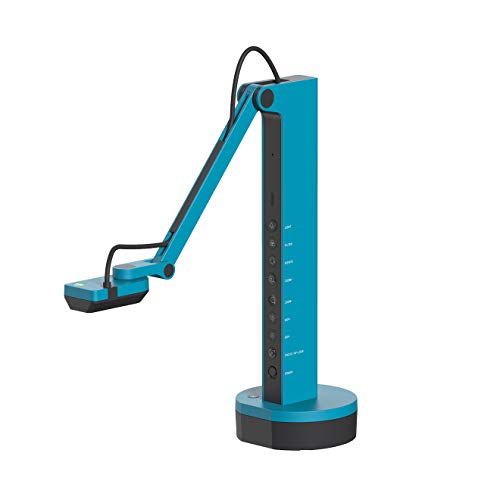
IPEVO VZ-X Wireless Document Camera
- Wi-Fi, HDMI, and USB connectivity
- 9–12-hour battery with up to 33-foot wireless range
- Near-4K USB capture and built-in LED
Best For: Presenters needing wireless or direct-to-display operation
Best Budget-Friendly Starter

- Functions as a document camera and webcam
- A3 support with Full HD at up to 30 fps
- LED lighting, autofocus, and image mirroring
Best For: New users wanting a flexible wired camera for lessons and calls
High-Resolution Starter
INS-1 Classic USB Document Camera

- 8MP imaging with 30fps video
- Autofocus, macro mode, LED, and mic
- Includes annotation and recording software
Best For: Beginners wanting detailed images and useful software
Flexible Manual-Focus Pick
USB Document Camera Visualizer

- Manual focus with up to 1080p video
- Folds down and rotates 360 degrees
- Works as a document camera and webcam
Best For: Computer-based teaching with hands-on focus control
Large-Format 4K-Style Detail

- 8MP, 2448P capture at 30fps
- Covers A3-size materials
- Three-level light and dual microphones
Best For: Presenting large documents and detailed objects
Portable Teaching Pick
Gawervan 1080p USB Document Camera

- 1080p video at 30fps
- Foldable, portable USB design
- Dual noise-reduced microphones
Best For: Teachers and homeschoolers needing a compact, compatible camera
High-Resolution Classroom Pick
THUSTAR 8MP 4K Document Camera

- 8MP camera with up to 2448P output
- Autofocus and close-up macro capture
- Three-level LED lighting
Best For: Classrooms needing detailed A3-size demonstrations
Value Classroom Pick
PAKOTOO 8MP A3 USB Document Camera

- 8MP/2448P resolution with autofocus
- A3 coverage and foldable multi-joint body
- Adjustable LED brightness and exposure
Best For: Teachers needing broad classroom coverage on a USB budget
Best Overall – IPEVO V4K 8MP USB Document Camera
For beginners comparing document cameras for beginners, the IPEVO V4K is a straightforward USB model with sharp 8MP capture, autofocus, and broad Mac, Windows, and Chromebook compatibility. Its high frame rate and fast focusing make it practical for live lessons, demonstrations, and video calls.
Best For: First-time users who want sharp USB video and dependable computer compatibility.
Pros:
- Captures up to 3264 x 2448 resolution with an 8MP Sony CMOS sensor.
- Streams up to 30 fps in Full HD for smoother live demonstrations.
- Autofocus and a multi-jointed stand simplify frequent use and repositioning.
Cons:
- Requires a USB connection and a compatible computer; it does not offer wireless connectivity.
- The maximum shooting area is about 13.46 x 10.04 inches.
The V4K is a strong starting point when image quality and simple plug-in operation matter more than wireless presentation features. Check your computer specifications before buying, particularly for higher-resolution streaming.
Best for Large Materials – INS-2 UHD 4K Document Camera
Among document cameras for beginners, the INS-2 stands out for users who need to show large pages, artwork, or two-page spreads. It combines 4K video, an A3-capable adjustable arm, built-in lighting, and software tools that can make classroom presentations easier to enhance.
Best For: Educators and art instructors displaying large documents, artwork, and detailed projects.
Pros:
- 13MP Sony sensor records 4K video at 3840 x 2160 and 30 fps.
- Flexible arm supports documents up to A3 size.
- Includes LED lighting, dual-mode autofocus, annotation, recording, scanning, and OCR software.
Cons:
- Its larger-format design weighs 2.3 pounds, making it less compact than simpler models.
- Compatibility depends on relatively specific operating-system versions for some devices.
The INS-2 is more feature-rich than many beginner models, but those capabilities are useful if your presentations involve artwork or oversized materials. It is especially appealing when built-in software and lighting can replace separate classroom tools.
Best Wireless Option – IPEVO VZ-X Wireless Document Camera
The IPEVO VZ-X is a flexible choice for beginners exploring document cameras for beginners because it supports Wi-Fi, HDMI, and USB connections. That lets you present through a computer, mobile device, Apple TV, projector, TV, or monitor, while its built-in battery supports longer untethered sessions.
Best For: Presenters who want wireless freedom or direct connections to displays and mobile devices.
Pros:
- Offers three connection modes: Wi-Fi, HDMI, and USB.
- Provides up to 9–12 hours of battery life and a wireless range of up to 33 feet.
- Built-in LED, swiveling head, and multi-jointed stand support flexible positioning.
Cons:
- Wi-Fi and HDMI modes capture at 1920 x 1080, while near-4K capture requires USB mode.
- It uses manual focus, which may require more adjustment than an autofocus model.
The VZ-X is the better fit when connection flexibility matters more than a simple USB-only setup. Its battery and wireless range can make room-wide demonstrations easier, though USB is the choice for its highest listed resolution.
Best Budget-Friendly Starter – PAKOTOO 5MP A3 USB Doc Camera
The PAKOTOO PA-800 is a practical entry point for beginners choosing document cameras for beginners, with a flexible design, A3 coverage, autofocus, and built-in lighting. It also works as a webcam, making it useful for remote teaching, meetings, and live demonstrations from a Mac, Windows PC, or Chromebook.
Best For: New users who want an affordable-style multifunction camera for lessons and video calls.
Pros:
- Works as both a document camera and webcam, with a flexible hose-style arm.
- Supports A3-sized materials and Full HD streaming at up to 30 fps.
- Includes three-level LED lighting, exposure adjustment, image mirroring, and autofocus.
Cons:
- It is not fully plug and play; users must select the USB camera in their computer system.
- Its 5MP sensor offers less listed resolution than the 8MP and 13MP alternatives.
- USB 2.0 connectivity is wired and does not include HDMI output.
The PA-800 makes sense for beginners who value versatility and basic classroom controls over maximum resolution. Be prepared to select the camera manually in your operating system during setup.
High-Resolution Starter – INS-1 Classic USB Document Camera
For beginners comparing document cameras for beginners, the INS-1 is a versatile USB-A model with 8MP imaging, autofocus, built-in lighting, and included software. It supports live demonstrations, online teaching, conferencing, and close-up work without requiring a complicated setup.
Best For: Beginners who want strong image detail, autofocus, and bundled annotation software for teaching or demonstrations.
Pros:
- 8MP capture with video streaming up to 30 fps.
- Autofocus and macro capability for objects as close as 3.9 inches.
- Built-in LED, anti-glare sheet, brightness control, and microphone.
- Works with Windows, Mac, Chromebook, and compatible USB-C iPads.
Cons:
- Uses a USB-A cable, so some newer devices may require an adapter.
- The supplied compatibility information lists different macOS minimum versions in different places.
Its combination of high resolution, simple plug-and-play connectivity, and practical Documate tools makes the INS-1 a well-rounded first document camera, especially for users who want more than basic video capture.
Flexible Manual-Focus Pick – USB Document Camera Visualizer
This manual-focus model is a practical choice for beginners seeking document cameras for beginners that can also serve as a webcam. Its foldable design, 360-degree rotation, adjustable height, and USB-C connection make it useful for lessons, video calls, and live demonstrations.
Best For: Beginners who prefer hands-on focus control and a flexible camera arm for home teaching or office use.
Pros:
- Manual focus helps keep presentations from repeatedly refocusing.
- Foldable body with 360-degree rotation and height up to 20.4 inches.
- Functions as a document camera, visualizer, and webcam.
- Built-in microphone and compatibility with major conferencing software.
Cons:
- Only a 2MP camera with up to 1080p stated video resolution.
- Requires a computer and is not compatible with iPads, phones, or other portable devices.
- Manual focusing requires more user adjustment than autofocus models.
The main appeal is control: users can set focus precisely and position the camera around larger or varied objects. It is a sensible beginner option if computer-only operation and manual adjustment are acceptable.
Large-Format 4K-Style Detail – Kitchbai 8MP A3 Visualiser
For beginners who need document cameras for beginners with a larger capture area, this Kitchbai visualizer combines 8MP imaging, A3-size coverage, foldable multi-joint positioning, and adjustable lighting. It is designed for live demonstrations and works with Windows, macOS, and Chrome OS.
Best For: Beginners presenting larger documents, books, or 2D and 3D objects who want detailed video and flexible positioning.
Pros:
- 8MP capture with up to 2448P output and 30fps live transmission.
- Maximum stated coverage of 16.5 by 11.6 inches for A3-size materials.
- Three brightness levels and manual image reversal controls.
- Macro capability as close as 3.94 inches, plus dual noise-reducing microphones.
Cons:
- Manual focus-button operation may require more attention than continuous autofocus.
- The tall, multi-joint design may take more desk space when fully extended.
This is the strongest fit of the three for large-format teaching materials and detailed object demonstrations. Its lighting, image controls, and foldable structure give beginners useful flexibility without requiring a separate microphone.
Portable Teaching Pick – Gawervan 1080p USB Document Camera
For beginners choosing document cameras for beginners, the Gawervan offers a straightforward USB setup with 1080p video, a foldable design, and compatibility with Windows, Mac, and Chromebook systems. Its manual focus and flexible 360° lens make it suitable for showing worksheets, objects, and demonstrations.
Best For: Teachers, homeschoolers, and remote presenters who want a compact camera with an integrated microphone.
Pros:
- 1080p video at up to 30 frames per second.
- Foldable hose and compact 0.53 kg design for portability.
- Dual built-in microphones are designed to reduce background noise.
- Works with Windows, Mac, Chromebook, Teams, Skype, and other supported apps.
Cons:
- Manual focus requires adjustment when changing subjects or distances.
- No built-in flash, and the camera is not water resistant.
The Gawervan is a practical entry-level option when portability and broad computer compatibility matter more than advanced scanning features. Manual focus gives control, but beginners may prefer autofocus for rapidly changing subjects.
High-Resolution Classroom Pick – THUSTAR 8MP 4K Document Camera
The THUSTAR is a strong choice for beginners who want document cameras for beginners with more image detail and classroom-oriented controls. It supports up to 2448P output, autofocus, A3-size coverage, adjustable brightness, and a foldable multi-joint design.
Best For: Classroom demonstrations, large worksheets, 3D objects, and distance learning where image detail and lighting flexibility are useful.
Pros:
- 8MP sensor with up to 2448P/4K video capture specifications.
- Autofocus button and macro focus down to 3.94 inches.
- Three-level LED lighting and manual brightness controls help in varied lighting.
- Supports Windows, macOS, Chrome OS, and major meeting platforms.
Cons:
- At approximately 0.84 kg, it is heavier than the Gawervan option.
- Its USB 2.0 connection may be less convenient for newer setups than USB-C.
With autofocus, image reversal controls, A3 coverage, and built-in microphones, the THUSTAR provides a versatile beginner-friendly feature set. It is particularly appealing when capturing larger materials or small objects is a priority.
Value Classroom Pick – PAKOTOO 8MP A3 USB Document Camera
The PAKOTOO is designed for beginners exploring document cameras for beginners and offers 8MP resolution, autofocus, A3/A4 coverage, adjustable lighting, and a foldable structure. It connects by USB and works with Windows, Mac, and Chromebook computers, though setup requires selecting the USB camera in the computer’s system.
Best For: Teachers and students who need an affordable-style classroom camera for documents, 2D materials, and 3D objects.
Pros:
- 2448P high-definition resolution with one-press autofocus.
- Three brightness levels and ten exposure adjustments.
- Foldable, multi-joint body supports multiple viewing angles.
- Image can be reversed horizontally or vertically using physical controls.
Cons:
- Not plug and play; users must select “USB Camera” in the computer system.
- Does not support zoom, HDMI, or iPad compatibility.
- USB 2.0 connection may limit flexibility for some setups.
The PAKOTOO covers the core needs of classroom beginners with autofocus, lighting controls, and broad document coverage. Its setup caveat and missing HDMI, zoom, and iPad support should be considered before buying.
How We Picked the Best Document Cameras for Beginners
We focused on models that are practical for first-time users and suitable for classrooms, tutoring, video calls, demonstrations, and remote instruction. Our comparison emphasizes USB and wireless connectivity, operating-system compatibility, image resolution, A3 or A4 coverage, built-in microphones, lighting, foldable designs, and controls such as autofocus, manual focus, image inversion, and rotation.
Resolution claims are only one part of the experience. A camera also needs a stable arm, useful framing, adequate lighting, and software compatibility. Products with broader connectivity or more flexible positioning can be worth considering when you expect to use the camera beyond basic document display.
Quick Comparison
| Best For | Features to Prioritize | Recommended Type |
|---|---|---|
| Basic teaching and video calls | Plug-and-play USB, built-in microphone, adjustable arm | 8MP USB document camera |
| Detailed diagrams and demonstrations | 4K capture, strong lighting, stable positioning | 4K or UHD model |
| Large worksheets and books | A3 coverage, wide frame, image rotation | A3-size visualizer |
| Flexible classroom setups | Wi-Fi, HDMI, and USB connectivity | Wireless multi-mode model |
| Dim rooms | Adjustable built-in LED lights | Model with multi-level illumination |
Key Buying Factors for Document Cameras for Beginners
Connection and Compatibility
USB is usually the simplest choice because it can connect directly to a computer or Chromebook and work with common conferencing or teaching software. Check whether the camera supports your operating system before buying. HDMI is useful when you want to connect directly to a display, while Wi-Fi can reduce cable clutter but may require additional setup.
Resolution and Focus
Higher resolution helps preserve small print, handwriting, diagrams, and texture, but only when the camera is well positioned and adequately lit. Autofocus is convenient for changing between pages and objects. Manual focus can be preferable for demonstrations where you want the focal point to remain fixed.
Coverage, Lighting, and Positioning
Choose A3 coverage if you regularly show large worksheets, books, artwork, or science projects. Built-in LED lights are helpful in shadowed rooms, and adjustable brightness can prevent glare on glossy pages. A foldable arm makes storage easier, while image rotation and inversion controls help correct awkward orientations.
Microphones and Everyday Controls
A built-in or dual microphone can simplify remote teaching and meetings, although a dedicated headset may still provide clearer audio. Look for easy-to-reach controls for exposure, focus, zoom, and image orientation so you can adjust the view without interrupting a lesson.
Who Should Buy Which Document Cameras for Beginners?
Choose a straightforward 8MP USB model if you want an affordable, beginner-friendly camera for worksheets, books, tutoring, or occasional video calls. A 4K model is a better fit for detailed diagrams, fine print, art, and demonstrations where clarity matters. Select an A3-capable model for large pages and classroom projects.
If you need to present without staying next to a computer, consider a model with Wi-Fi or HDMI in addition to USB. Buyers who work in dark or inconsistent lighting should prioritize adjustable LEDs. For frequent travel or limited desk space, a foldable design is especially useful. Finally, verify the included software, cable requirements, and camera controls before purchase so the device fits your existing teaching or conferencing workflow.