Choosing the right thermocouple data acquisition system comes down to channel count, probe compatibility, logging capacity, and software that fits your workflow.
Whether you need a compact USB recorder for bench testing or a networked setup for remote monitoring, the right system can save time and improve measurement confidence.
Best 10 Thermocouple Data Acquisition System Picks for 2026
DATAQ DI-2008-DIRECT 8-Channel Thermocouple Logger

- 8 isolated analog input channels
- Supports thermocouple types J, K, T, B, R, S, E, N
- Works with Windows, Mac, Chromebook, and Linux
Best For: Cross-platform thermocouple and voltage logging
Onset UX100-014M Thermocouple Logger

- Supports Type J, K, T, E, R, S, B, N
- Includes USB cable and free HOBOware software
- Thermocouples are not included
Best For: Users who already have thermocouples and want a compact logger
DATAQ DI-2008 with ExcelLink Thermocouple Logger
- Includes WinDaq ExcelLink for Excel streaming
- 8 isolated analog input channels
- Supports thermocouple types J, K, T, B, R, S, E, N
Best For: Excel-based thermocouple logging and industrial monitoring
PerfectPrime TC0520 4-Channel Thermocouple Logger

- Four channels for K, J, E, and T
- 3.35-inch LCD display plus USB PC software
- Internal storage for 16,000 records per channel
Best For: Simple 4-channel thermocouple logging with local display
TempTouch WiFi Thermocouple Sensor

- Supports K, J, T, E, R, S, B, and N probes
- Logs ambient temp, probe temp, and humidity
- Exports data to CSV, Excel, or PDF
Best For: WiFi-connected monitoring with alerts and cloud-friendly logging
DP-373 Thermocouple Data Logger

- Records up to 5000 groups on-device
- Supports 4 channels with K/J switching
- Includes audible, visible alarms and ADJ compensation
Best For: Bench or lab logging with multi-channel alarms and calibration support
AZ Instruments 4 Channel Logger

- Uses 8G SD card for flexible logging
- Independent alarms on all four channels
- Programmable sampling rate from 1 second
Best For: SD-card logging with independent channel alarms
4-Channel Thermocouple Meter with USB Export

- 4 channels for simultaneous K/J/T measurements
- Stores 5000 groups and exports over USB
- ADJ compensation plus audible/visible alarms
Best For: Technicians needing a handheld multi-channel thermocouple logger with PC export
4-Channel Thermocouple Logger with Unlimited Records

- 4-channel real-time display on one screen
- Unlimited logging via included 8GB SD card
- TXT export opens directly in Excel
Best For: Labs and cold-storage monitoring with simple SD-card data capture
4-Channel K-Type Logger with 48K Records
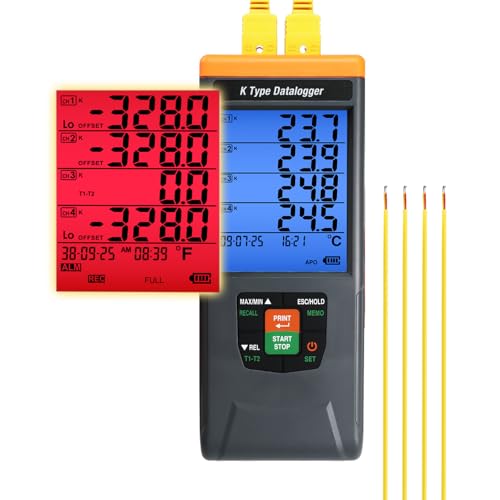
- Logs up to 48,000 records with adjustable sampling
- USB-C CSV export without extra software
- Password protection and timestamped records
Best For: Labs and industrial monitoring that need traceable, long-duration logging
Cross-Platform 8-Channel DAQ – DATAQ DI-2008-DIRECT 8-Channel Thermocouple Logger
If you need a thermocouple data acquisition system that can handle both temperature and voltage measurements, the DATAQ DI-2008-DIRECT is built for flexible use across common desktop and laptop platforms. It supports thermocouple types J, K, T, B, R, S, E, and N, with isolated analog inputs and 16-bit resolution for general lab or field logging.
Best For: Users who want a cross-platform, plug-and-play DAQ for thermocouple and voltage logging.
Pros:
- 8 differential and isolated analog input channels
- Works with Windows, Mac, Chromebook, and Linux via WinDaq Direct
- Supports thermocouple types J, K, T, B, R, S, E, and N
- 16-bit ADC resolution with up to 2000 Hz single-channel throughput
Cons:
- Two or more channels are limited to 200 Hz throughput
- Designed as DAQ hardware, so it may require software workflow setup
- No built-in display for stand-alone viewing
Overall, this is a strong fit if you want one compact system that can cover thermocouple measurement and voltage input on multiple operating systems. The isolated inputs and wide sensor compatibility make it a practical general-purpose logger.
Compact Thermocouple Logger – Onset UX100-014M Thermocouple Logger
The Onset UX100-014M is a straightforward thermocouple data acquisition system for users who already have their own probes and want a compact logger. It supports Type J, K, T, E, R, S, B, and N thermocouples and comes with the logger, USB cable, and free HOBOware software download.
Best For: Buyers who need a lightweight thermocouple logger and already have thermocouples.
Pros:
- Supports Type J, K, T, E, R, S, B, and N thermocouples
- Includes USB cable and free HOBOware software download
- Very compact at 1.6 ounces
- Screw-mount design for simple installation
Cons:
- Thermocouples are not included
- Single-purpose logger compared with multi-input DAQ systems
- May require separate probes and setup accessories
This model makes sense when you want a small, dedicated thermocouple logger rather than a full multi-signal acquisition unit. Since the probes are not included, it is best suited to users building out an existing temperature monitoring setup.
Excel-Ready Industrial DAQ – DATAQ DI-2008 with ExcelLink Thermocouple Logger
If your thermocouple data acquisition system needs to feed spreadsheets quickly, the DATAQ DI-2008 is a practical option. It offers 8 isolated analog inputs, supports thermocouple types J through N, and includes WinDaq ExcelLink for real-time capture and streaming into Excel.
Best For: Users who want thermocouple logging with Excel streaming and cross-platform support.
Pros:
- Includes WinDaq ExcelLink for real-time streaming to Excel
- 8 differential and isolated analog input channels
- Supports thermocouple types J, K, T, B, R, S, E, and N
- Works with Windows, Mac, Chromebook, and Linux via WinDaq Direct
Cons:
- Two or more channels are limited to 200 Hz throughput
- Requires a corded power setup
- More focused on logging and streaming than on built-in display features
This version stands out if Excel integration is part of your workflow, since the included streaming software adds clear value. It keeps the same broad input support and cross-platform compatibility as the related DATAQ model, making it useful for industrial or lab logging.
4-Channel USB Thermometer – PerfectPrime TC0520 4-Channel Thermocouple Logger
The PerfectPrime TC0520 is a compact thermocouple data acquisition system for users who want a simple 4-channel USB thermometer with PC software. It supports K, J, E, and T thermocouples, includes internal datalog storage, and offers real-time monitoring with graphing and data import/export on Windows.
Best For: Buyers who want a small 4-channel thermocouple logger with a built-in LCD and PC software.
Pros:
- Four thermocouple channels for K, J, E, and T types
- 3.35-inch LCD display for local viewing
- Internal storage for up to 16,000 records per channel
- USB PC software supports real-time monitor, graphing, and data export
Cons:
- Only supports four thermocouple types
- Designed for Windows PC software
- Uses AAA batteries in addition to USB power
For straightforward four-channel temperature logging, this model keeps the workflow simple and portable. The onboard display and internal storage make it convenient for checking readings without relying only on a computer.
Wireless Monitoring – TempTouch WiFi Thermocouple Sensor
If you need a thermocouple data acquisition system for remote monitoring, the TempTouch WiFi sensor keeps temperature and humidity logging simple. It works with K, J, T, E, R, S, B, and N probes, supports app-based alerts, and offers adjustable data logging for record keeping and analysis.
Best For: WiFi-connected temperature and humidity monitoring across HVAC, storage, lab, and food safety setups.
Pros:
- Compatible with multiple thermocouple types, including K, J, T, E, R, S, B, and N.
- Tracks ambient temperature, probe temperature, and humidity with custom alert thresholds.
- Exports logs in CSV, Excel, or PDF for compliance and reporting.
- Battery-powered design includes mounting options for permanent or portable use.
Cons:
- Requires 2.4GHz WiFi to use app alerts and remote monitoring features.
- Included probe is K-type, so other thermocouple types need separate probes.
- Limited to an upper temperature range of 50°C for the sensor unit.
This is a strong choice if you want connected monitoring rather than a bench-only logger. It is especially practical when you need long-term logging, email/text alerts, and easy exports from one compact system.
4-Channel Logger – DP-373 Thermocouple Data Logger
The DP-373 is a practical thermocouple data acquisition system for users who want four-channel measurement, programmable recording, and PC-linked storage. It records up to 5000 groups on the meter itself and supports unlimited storage when connected to software on a computer.
Best For: Multi-channel temperature logging with audible and visible alarms for workshop or lab use.
Pros:
- Four channels with 5000-group onboard recording and unlimited PC storage.
- Wide measurement range up to 2501°F, with K and J switching support.
- Audible and visible alarms help flag threshold breaches quickly.
- Includes ADJ temperature compensation for calibration adjustments.
Cons:
- Indoor-use design only.
- Uses USB for computer connection rather than wireless logging.
- K-type probe range is narrower than the meter’s full measurement range.
This model suits users who need a straightforward, feature-rich logger with multiple channels and basic calibration control. It stands out more for measurement depth and alarm handling than for modern connectivity.
SD Card Recorder – AZ Instruments 4 Channel Logger
If you want a thermocouple data acquisition system with simple removable storage, this AZ Instruments 4-channel logger uses an 8G SD card for unlimited manual memories and auto logging, depending on card capacity. It also gives you independent alarms per channel, a large LCD, and a programmable sampling rate starting at 1 second.
Best For: Users who want SD-card-based logging with four independently alarmed channels.
Pros:
- Four-channel logging with independent high/low alarm settings.
- 8G SD card support enables flexible manual and auto logging.
- Large LCD with real-time date and time display.
- Programmable sampling from 1 second for detailed recording.
Cons:
- Indoor-only design.
- Includes only two K-type probes despite four channels.
- Less connected than USB- or app-based systems.
This logger makes sense when removable storage is more important than app connectivity. It is a solid fit for users who want channel-by-channel alarms and dependable long-term recording on SD media.
Multi-Channel HVAC Logger – 4-Channel Thermocouple Meter with USB Export
If you need a thermocouple data acquisition system for HVAC checks, lab work, or general temperature logging, this 4-channel Landtek model is built around practical monitoring. It can read K, J, and T type thermocouples, record up to 5000 groups internally, and export data to a PC over USB for later review.
Best For: Technicians and users who want a handheld 4-channel thermocouple logger with USB export, alarm functions, and wide-range temperature measurement.
Pros:
- 4 channels support simultaneous multi-point temperature measurement.
- Records up to 5000 groups and also supports unlimited USB datalogging on PC software.
- Wide temperature range covers K, J, and T type thermocouples for HVAC and refrigeration use.
- Includes ADJ compensation, Max/Min/Average, hold, backlit LCD, and audible/visible alarms.
Cons:
- PC export depends on Windows software support.
- Included probes are K-type only, so J and T probes would need to be added separately.
This is a solid choice if you want a straightforward handheld logger with strong range, simple data capture, and compensation tools for field measurements.
SD Card Logging Workhorse – 4-Channel Thermocouple Logger with Unlimited Records
This thermocouple data acquisition system is aimed at users who want continuous logging without worrying about storage limits. With four channels, an included 8GB SD card, and .TXT output that opens in Excel, it is designed for practical temperature monitoring across multiple points.
Best For: Labs, cold storage, and shop users who want unlimited SD-card logging with simple Excel-friendly file access.
Pros:
- 4 thermocouple channels show four locations at once on the backlit LCD.
- Unlimited auto-logging uses the included 8GB SD card.
- TXT files can be read in Excel without extra software or drivers.
- Hi/Lo alarms, scheduled start, MAX/MIN, REL, and T1-T2 differential add useful monitoring tools.
Cons:
- Included bead probes cover a narrower range than the main unit.
- Runs on 4 AA batteries, which may be less convenient for long unattended sessions.
For buyers who value easy file handling and uninterrupted logging, this model stands out as a practical four-channel recorder with a simple workflow.
Long-Run Lab Recorder – 4-Channel K-Type Logger with 48K Records
If your thermocouple data acquisition system needs longer logging intervals, traceable records, and strong alarm support, this 4-channel K-type recorder is the most feature-heavy of the group. It supports up to 48,000 records, USB-C CSV export, and lab-oriented functions like password protection and timestamped data.
Best For: Labs and industrial users who want high-capacity logging, calibration traceability, and long battery runtime.
Pros:
- Supports K-type thermocouples with a wide -200°C to 1370°C range and 0.1° resolution.
- Logs up to 48,000 records with adjustable sampling rates and manual save mode.
- Exports CSV via USB-C without extra software.
- Includes per-channel alarms, offset calibration, HOLD/REL modes, and a dual-color backlit LCD.
Cons:
- Designed for K-type probes only, so it is less flexible than multi-type models.
- Some advanced features may be more than casual users need.
This model is the best fit when you need a thermocouple logger with more records, stronger data control, and longer runtime for demanding monitoring tasks.
How We Picked the Best Thermocouple Data Acquisition System Options
We focused on models that offer practical thermocouple support, dependable logging, and clear value for buyers who need repeatable temperature measurement. Priority went to systems with useful channel counts, broad probe compatibility, export-friendly software, and logging features suited to lab, HVAC, industrial, and field use.
We also weighed connectivity and platform support. Some buyers need direct USB access on Windows, while others benefit from plug-and-play compatibility across Mac, Linux, Chromebook, or wireless monitoring. Accuracy, record depth, and the ability to handle continuous logging were important differentiators as well.
Quick Comparison
USB-connected DAQ units are usually the best fit for technical users who want more control over sampling and data export. Standalone thermocouple loggers are often simpler to deploy when you need fast setup, basic recording, and portability. Wi-Fi-enabled monitors make more sense when remote viewing or alerting matters more than bench-based analysis.
For multi-point measurement, 4-channel and 8-channel options are the most flexible. If your work involves different probe types or mixed environments, look for systems that support multiple thermocouple standards and enough memory or storage for long runs.
Key Buying Factors for a Thermocouple Data Acquisition System
Channel Count and Expansion
Start with how many temperatures you need to track at once. A 4-channel unit is enough for many test setups, while 8-channel devices are better for process monitoring, comparative testing, or redundant measurements.
Thermocouple Type Support
Make sure the unit supports the probe types you already use. K type is common, but some projects require J, T, E, R, S, B, or N compatibility. Broader support adds flexibility if your application changes over time.
Logging, Memory, and Export
Consider whether you need simple recorded readings or long-duration unattended logging. Check record capacity, SD card support, and whether the software allows easy CSV export for analysis and reporting.
Software and Connectivity
USB works well for desktop data collection, while Wi-Fi or direct-network options are better for monitoring from a distance. Also verify operating system compatibility so your Thermocouple Data Acquisition System will fit your lab or field computer setup.
Measurement Range and Use Case
High-temperature industrial work, cold storage monitoring, and general lab testing place different demands on range and resolution. Match the measurement window to your expected operating conditions, with some margin for safety and flexibility.
Who Should Buy Which Thermocouple Data Acquisition System?
If you want the most control for testing, calibration, or analysis, choose a USB DAQ system with solid software and multiple inputs. If you need straightforward temperature logging with minimal setup, a compact standalone recorder is usually the better fit. For remote monitoring, wireless models are worth the extra cost because they simplify access and oversight.
In short, the best Thermocouple Data Acquisition System is the one that matches your channel needs, probe types, software environment, and logging duration without adding complexity you will not use.