coobest Kids Microscope review: if you want a beginner-friendly handheld microscope that makes science feel like play, this one is built for that job.
It combines a screen, easy controls, and photo/video capture in a compact design.
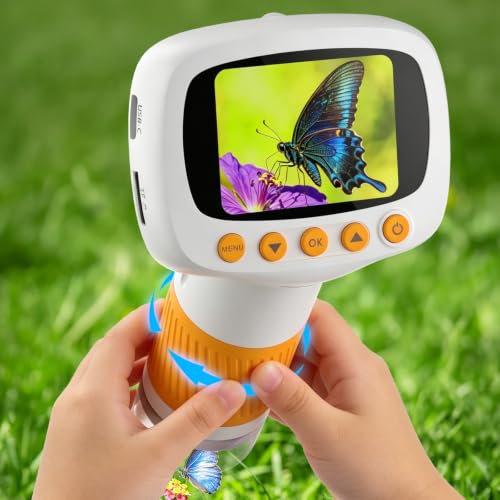
coobest Microscope Review Summary
Buy the coobest Kids Microscope if you want a simple, screen-based way to introduce a child to insects, leaves, fabrics, coins, and classroom specimens. It is especially appealing for families who want an educational gift that does not require the learning curve of a traditional eyepiece microscope.
The display-first design, adjustable lighting, and built-in capture features make it a strong fit for curious kids, parent-child projects, and casual STEM exploration.
What stands out most is how the coobest Kids Microscope lowers the barrier to use.
Instead of peering through tiny optics, children can look at a 2-inch IPS digital screen, adjust focus with a knob, and explore specimens in real time.
That makes the learning experience more social and more intuitive, especially for younger users over 3 years old.
Still, the coobest Kids Microscope is not trying to compete with advanced lab microscopes.
Its plastic build, compact screen, and battery-powered design signal a portable learning tool rather than a precision scientific instrument.
If you understand that tradeoff, the value proposition is strong: simple operation, helpful lighting, recording capability, and enough magnification to make everyday objects fascinating.
Quick Scorecard
| Category | Score | Takeaway |
|---|---|---|
| Magnification & detail | 8.7 | Up to 1000x with a 50x-1000x range for fine textures and small specimens. |
| Display & visibility | 8.2 | 2-inch IPS screen is more kid-friendly than a traditional eyepiece. |
| Lighting & image clarity | 8.6 | 8 ring LEDs with 6 brightness levels help keep images visible. |
| Ease of use for kids | 8.4 | Palm-sized body, long-press power, and knob focus are easy to learn. |
| Recording & storage | 8.0 | Built-in storage and TF card expansion support photos and video. |
| PC connectivity | 7.8 | USB mirroring works with Windows and Mac for shared viewing. |
Overall, this is a well-designed starter microscope for children and families who want a hands-on science gadget that is more engaging than a toy but less intimidating than a school lab microscope.
Key Features and Specifications of coobest Microscope
The coobest Kids Microscope is compact, lightweight, and deliberately simple.
The design choices clearly favor ease of use, portability, and visible learning over technical complexity.
| Specification | Detail |
|---|---|
| Brand | coobest |
| Product type | Handheld digital microscope for kids |
| Recommended age | Over 3 years old |
| Material | Plastic |
| Color | Orange |
| Maximum magnification | 1000x |
| Magnification range | 50x-1000x |
| Display | 2-inch IPS digital screen |
| Light source | LED |
| LED brightness levels | 6 |
| Objective lens | Achromatic |
| Weight | 0.18 kilograms |
| Power source | Battery powered |
| Connectivity | USB to Windows/Mac |
| Recording | Photo and video capture |
| Storage | Built-in storage plus TF card expansion |
| Compatible device | Laptop |
| Real angle of view | 16 |
There are a few important design details worth highlighting.
The palm-sized body and anti-lost lanyard make it easier for younger children to hold and carry.
The long-press power on approach adds a tiny but meaningful layer of child-friendly control, reducing accidental activation.
The fine and coarse focusing knob is also a smart touch because it gives kids a more tactile, less frustrating way to sharpen the image.
From a category perspective, the features line up well with the purpose of the product: simple exploration, visual learning, and a low-stress introduction to microscopy.
If you are shopping for a serious biology setup, those same features will feel limited.
But for a child-focused portable microscope, they make sense.
Pros and Cons of coobest Microscope
Here is the practical coobest Kids Microscope pros and cons breakdown from a buyer’s point of view.
| Pros | Cons |
|---|---|
| Kid-friendly, simple operation | Plastic build feels less premium than metal microscopes |
| Portable and lightweight at 0.18 kg | Battery-powered design needs upkeep |
| Large zoom range for the size | Best for casual exploration, not advanced lab work |
| Screen-based viewing is easier than an eyepiece | Small screen may limit detailed viewing compared with larger displays |
| Adjustable LED lighting improves visibility | TF card storage details are not fully specified |
| Photo and video capture add educational value | Computer viewing depends on compatible Windows or Mac setup |
| USB connection supports shared learning | Not designed for professional microscopy tasks |
The biggest strength is accessibility. The biggest drawback is that the hardware is intentionally basic.
That tradeoff is acceptable if your main goal is a kid-friendly science toy that teaches observation skills.
Who Should Buy coobest Microscope?
The coobest Kids Microscope is a good match for families and educators who want a beginner microscope that encourages curiosity without overwhelming the user.
It is especially suitable if you want a portable digital microscope that can travel from the backyard to the classroom.
- Parents buying an educational gift for children who like bugs, plants, rocks, or small objects
- Families who want screen-based viewing instead of an eyepiece microscope
- Teachers or homeschoolers looking for a simple shared-observation tool
- Kids interested in STEM who benefit from easy controls and instant visual feedback
- Buyers who want photo/video capture for science projects and memory keeping
It is also a strong fit for households that value portability.
Because the coobest Kids Microscope is lightweight and handheld, it can be used outdoors or packed for travel more easily than a larger bench microscope.
Who should skip it? If you need highly precise optics, a bigger viewing area, or a microscope for advanced school labs, this is not the right purchase.
In that case, a more traditional optical microscope or a larger digital model would be a better long-term investment.
How the Screen and Zoom Work
The screen is one of the main reasons the coobest Kids Microscope stands out in the beginner category.
A 2-inch IPS display gives children a direct, colorful view of specimens without having to align their eye with a small eyepiece.
That alone can make the difference between a frustrated child and one who stays engaged long enough to learn something.
In practical use, the 50x-1000x magnification range gives you flexibility.
At lower magnifications, kids can inspect coins, leaves, paper fibers, and textures.
At higher magnifications, the product is aimed at showing tiny details such as insect wing texture and plant cells.
For a kid-oriented handheld microscope, that range is impressive and gives the product more educational depth than many toy-grade models.
That said, buyers should keep expectations realistic.
Maximum magnification numbers can sound dramatic, but the real-world usefulness depends on lighting, specimen preparation, and steadiness.
Since this is a handheld unit, image stability matters.
A child will get the best results when the specimen is placed on a stable surface and the focus is adjusted carefully.
Bottom line: the screen and zoom combination is well matched to its intended audience.
It is more about discovering details easily than about delivering textbook-perfect lab imaging.
Photo, Video, and TF Card Storage
The recording features add a lot of value for families who want to save discoveries.
The coobest Kids Microscope supports photo and video capture, with built-in storage and TF card expansion for more flexible use.
This is especially useful in a classroom, homeschool, or parent-child science setting because kids can document what they saw instead of simply looking and moving on.
A child can take a picture of an insect wing, record a short clip of a leaf surface, or save a scan of a rock texture for a science notebook.
The practical advantage is educational retention.
When children can revisit the images later, it helps them remember what they observed and makes the experience feel more real.
It also makes the coobest Kids Microscope more than a one-and-done gadget.
The caution here is storage transparency.
The listing supports TF expansion, but it does not fully spell out every storage limitation.
If recording is important to you, that is worth noting.
Still, for casual family use, the feature set is very appealing.
LED Lighting and Focus Controls
Lighting is critical in any microscope, and the coobest Kids Microscope handles this well for its class.
It uses 8 ring LED lights with 6 brightness levels, which helps improve visibility in dim indoor spaces and adds flexibility when viewing different specimen types.
This matters because many beginner microscope disappointments come from poor lighting rather than poor magnification.
With adjustable LEDs, the user can better preserve color detail and reduce the washed-out look that often happens when a specimen is underlit or overlit.
In everyday use, that means more usable images and fewer frustrating sessions.
The focus control is another positive.
The knob-style system with fine and coarse focusing is a smart design choice for children because it gives them a sense of control without making the process too technical.
Kids can learn the basics of focusing while still getting quick results.
Design-wise, this is where the coobest Kids Microscope feels thoughtfully built. The lighting and focus controls are simple enough for kids, but useful enough for adults to appreciate.
Using the Microscope with a Windows or Mac Computer
One of the more valuable features for parents and teachers is the USB connection for live viewing on Windows and Mac computers.
This makes the microscope more collaborative because several people can observe the same specimen at once on a larger screen.
That has real classroom and homeschool benefits.
It allows parents to explain what children are seeing, annotate observations, or simply make the viewing experience more social.
A microscope that can be shared on a laptop becomes easier to use in group learning settings.
The tradeoff is that this feature depends on a compatible computer setup.
It is not a standalone limitation so much as a reminder that the coobest Kids Microscope works best in a modern digital learning environment.
If you already have a Windows or Mac laptop nearby, this becomes a useful bonus rather than a hurdle.
For buyers deciding between handheld digital microscopes, computer mirroring can be a major differentiator.
If your child likes to present discoveries to siblings or classmates, that shared-screen function gives the coobest Kids Microscope a real edge.
Best Uses for Science Learning and Nature Exploration
This product shines when used for low-pressure discovery.
It is ideal for looking at objects that children can find easily and safely around the house, yard, park, or classroom.
- Insects and bug wings
- Leaves, petals, and plant stems
- Coins, paper, fabric, and fibers
- Sand, salt, or soil grains
- Small classroom specimens and science project samples
Because it is lightweight and handheld, the coobest Kids Microscope also works well as an outdoor exploration tool.
Children can collect simple specimens, return to a stable table, and inspect them without needing a full lab setup.
That makes it especially valuable for families trying to build STEM habits through play.
If your main goal is to spark curiosity, this product does that well.
If you want a microscope for formal biology labs or detailed slide work, a traditional microscope kit will likely serve you better.
Alternatives to Consider
If you are comparing the coobest Kids Microscope with other options on Amazon, a few alternative product types make sense.
The best choice depends on whether you prioritize screen size, optical precision, or battery life.
- portable digital microscope with screen – worth considering if you want a larger display or a different user interface
- kids microscope kit – a better pick if you want a more traditional school-style science setup
- handheld digital microscope for kids – useful if you want to compare similar child-focused digital models
- beginner microscope kit for kids – a good alternative for structured STEM learning
Compared with these options, the coobest Kids Microscope lands in the sweet spot of portability, simplicity, and digital convenience.
It is not the most advanced, but it may be one of the easiest to live with for younger children.
Is coobest Microscope Worth It?
Yes, the coobest Kids Microscope is worth it for the right buyer. If you want a compact, child-friendly digital microscope that makes science visual, interactive, and easy to understand, it delivers a lot of useful features for the category.
The screen-based design, 1000x maximum magnification, adjustable LED lighting, and photo/video recording all support the same goal: helping kids explore the tiny details of the world without a steep learning curve.
The biggest reasons to buy are simple.
It is easy for kids to use, it is light enough to carry anywhere, and it turns ordinary objects into teaching moments. The biggest reasons to pass are also clear: the plastic build is basic, the screen is small, and advanced users will outgrow it.
So, is coobest Kids Microscope worth it? For families, beginners, and gift buyers, yes.
For serious microscopy work, no.
If you are shopping for a fun, practical, and educational starter microscope, this one is a solid pick and an easy recommendation.